
This plugin integrates Affiliates with eShop.
With this integration plugin, referrals are created automatically for your affiliates when sales are made through eShop.
The plugin allows you to set a referral (commission) rate so that your affiliates get credited with a referral based on a percentage of each sale’s total net amount.
Affiliates allows you to maintain your own affiliate program to boost sales through your online store powered by eShop. This is what you need:
- eShop
- Affiliates
- Affiliates eShop Integration Light (this plugin)
Install these, set up your shop, set the referral rate for affiliates and distribute your affiliates their affiliate links. Whenever an affiliate refers a client to your store and the client makes a purchase, you will see a referral created for the affiliate.
Feedback is welcome!
If you need help, have problems, want to leave feedback or want to provide constructive criticism, you can leave a comment below.
Installation
1. Install and activate the eShop plugin. Configure your shop.
2. Install and activate the Affiliates plugin. Use the default settings or configure it to your needs.
3. Install and activate the Affiliates eShop Integration Light plugin.
4. A new eShop Integration Light menu item will appear under the Affiliates menu in WordPress. Set the referral rate for your affiliates there.
Note that you can install the plugins from your WordPress installation directly: use the Add new option found in the Plugins menu.
You can also upload and extract them in your site’s /wp-content/plugins/ directory or use the Upload option.
Frequently Asked Questions
What features does this integration provide?
When a sale is made through eShop, a referral is recorded for the affiliate that referred the sale.
How can I set the amount that affiliates earn on each sale?
Go to Affiliates > eShop Integration Light and set the rate there.
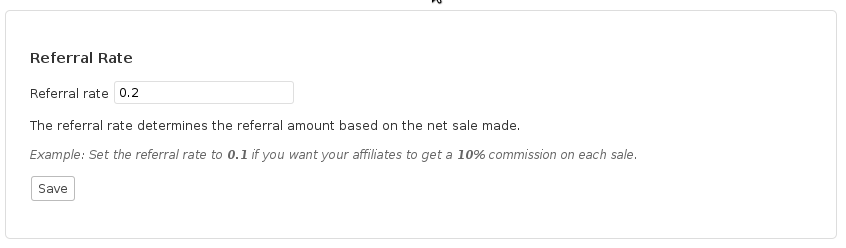
Example: If you want to give an affiliate 10% of each net total sales amount, set the rate to 0.1.
Screenshots
1. Referral rate setting – A 0.2 referral rate credits affiliates with 20% commissions on sales.
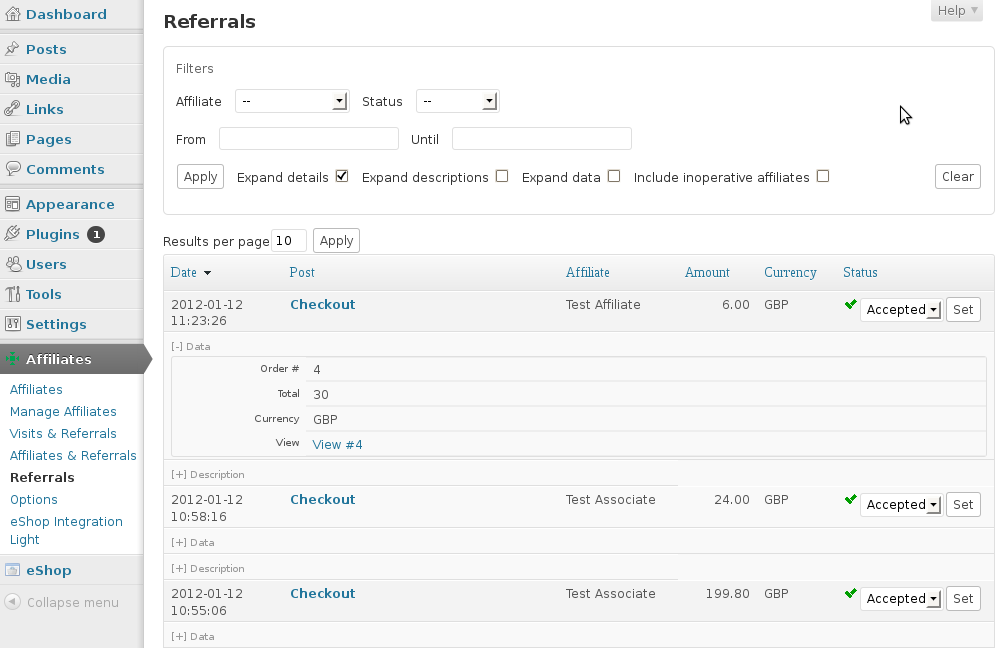
2. Referrals created automatically for sales – Each referral is linked to its order.




Is there any way to set the affiliate percentage differently for my physical products versus my digital downloads?
Hi Brett,
The eShop integrations do not support per-product rates. You could derive a solution from this skeleton implementation but note that it’s using the Affiliates Pro API, to make it work with the Affiliates plugin you would also need to adjust some API calls although that would be the minor part of implementing it.
Cheers
Hi, I am in my testing stage with my woo affiliate light plug in. When an affiliate sends a customer to purchase an item from my shop it show up and tells me how much commission they earned. How do I pay the affiliate? How do I mark them as paid. I do not see how to do this! Thanks!
Hi Maria,
Please check the documentation on that : http://www.itthinx.com/documentation/affiliates/affiliate-program-management/managing-referrals/
I want to know if it is possible to have an affiliate link associated with a specific products. If so what I’m I missing? I have all the plugins, affiliate, affiliate integration for eshop. I have my product but I want a specific person to be able to sale a specific product.
By the way I have the free version.
Hi,
you can use [affiliates_url] shortcode, for example:
[affiliates_url]http://www.example.com/somepage[/affiliates_url].cheers
Hello,
I apologized for that…the plugin actually is woo-comerce lite affiliate plugin.I installed it on my woocomerce website,but it doesn’t work and there is a message that’s been displayed on the top stating “The Affiliates WooCommerce Integration Light plugin requires an Affiliates plugin to be activated: Visit the Affiliates plugin page”which is this site…are we having any problems with this plugin?also how can we contact with u directly rather than leaving the comments here.
Hi,
to use this integration, you need Affiliates or Affiliates Pro or Affiliates Enterprise.
Affiliates plugin is the “commissions system” and Affiliates Woocommerce Integration is the integration with woocommerce.
You can contact us on support at itthinx dot com, but better use the commenting system, so we can help future users with the same problems.
cheers
hello,
I am using this plugin…but now it has started redirecting me to this website for activation of the plugin…will really appreciate if you can get the plugin activated.or do i need to pay for the activation
Hi,
the plugin doesn’t need activation. In this page, in “Installation” section you can see how to install.
Maybe you have been redirected using a link to Affiliates eShop Pro version.
cheers
Okey, looks good, thanks a lot!
Thanks for asking 🙂
Hi,
This plugin seems very nice so I wanted to check how it would run on my site before going to the Pro version.
I do run into a problem. I installed it and that all goes fine. But, when I follow the affiliate link, go through the order process, through checkout, but do NOT finish my payment, the order is seen as a success and thus credited to a referral. On the “referrals’ page in the menu I see the order and in the “post” column it says “order confirmation”. That page refers to the confirmation page of my shop (running Eshop). However, customers still have to pay through iDeal or whichever payment method, so the order isnt completed then.
How should this be fixed? I cant use it now because i cant risk these invalid purchases to be
Kind regards,
Walter
Hi Walter,
I think what you are looking for is the Default Referral Status option under Affiliates > Options. If you set that to Pending, then all referrals will be created in that status, meaning that they are held for review before being paid. Once you have verified a referral that is pending, you would set its status to Accepted, which means that it can be paid to the affiliate.
Cheers
Hi Kento,
Thanks for the quick reply. Changing that setting seems to solve it yes. However, I actually hoped that this could somehow go automatically, because with a lot of referrers and purchases going through this manually will take some time in the future. So kind of like an extra check when the customer returns to the shop page after having paid. Or is that an option available in the Pro version?
Regards,
Walter
Hi Walter,
The integration with Affiliates Pro has advanced settings and automates synchronizing referral and order status:
The above is from an additional menu item that the integration adds to the Affiliates menu.
If you have many referrals, then the Pro version also helps with the Totals section which provides accumulated totals by affiliate.
Cheers
I have first tried to manage a web-shop with Woo-Commerce, I did have some referrals, but I am not happy with Woo-Commerce.
When I change Woo-Commerce for eShop, do I loose those referrals or are they conserved in the Affiliates database because Affiliate-eShop light is just a data gathering skin of Affiliates?
If so, when I have a multisite installation, can I use the strong points of Woo-Commerce in a dedicated web-shop (with an Affiliate-Woo-Commerce light plugin) and the other products in an eShop environment and still collecting affiliates from both web-shops in one Affiliate database?
The referrals do not depend on the integration used (in a limited sense), in fact you can have several integrations running at the same time within one installation. In short, those referrals will still be there after you switch.
The way Affiliates behaves in a multisite environment is that it will run completely separate affiliate programs on each subsite. An option to centralize that has been discussed here during the last days (Google ;)) and an option to do that will most likely be available in general.
Every purchase through an affiliate link I made is recorded as Direct. I tried adding several affiliates, I changed the options and nothing… In Affiliates & Referrals I see 1 Hit and 1 Visit but 0 Referral and 0.0000 Ratio.
Assuming you have the integration plugin activated and set a referral rate, making a purchase after visiting an affiliate’s link will credit the affiliate with a referral, unless there is a conflict with another plugin or your setup. If all is set up correctly, disable all other plugins except eShop, Affiliates and the integration plugin and test.
Hi kento. The problem was that I renamed /wp-content folder after installing wordpress. This caused conflict with some plugins including eshop integration plugin. Problem solved. Thanks for developing this great plugin!
Many thanks, and good to see you got it working now 🙂
I have installed and active:
Affiliates eShop Integration Light 1.0.4
+ Affiliates 2.1.9
+ WordPress 3.5 ita
+ eShop for WordPress 6.3.3
+ eShop Languages plugin 0.0.1
+ eShop Order Emailer 2.1.0
But in my admin panel-dashboard I can’t see the Affiliate button, so I can’t administer it.
You can’t see the Affiliates menu? First try disabling all plugins except Affiliates and the integration plugin, make sure the menu is there. Then enable other plugins one by one and see when the menu disappears. That would be a conflicting plugin then. Let me know which one please so we can have a look.
I have installed affiliates with woocommerc,e then woocommerce was using too much RAM so I uninstalled woocommerce and installed eshop on wordpress, but now I can’t see the Affiliate menu as with woocommerc,e maybe I have to uninstall and re-install affiliates? how to do that?
Do you mean the integration options? You need to install the integration plugin for eShop: http://wordpress.org/extend/plugins/affiliates-eshop-light/
how to display forum on the front end side
Forum? What does that have to do with the eShop light integration please?
ok i found the problem i installed the eshop e-mailer and for some reason that blocked the affiliate plugin from being seen. and that’s the answer if any one has a similar problem. thanks for your help and quick response.
Many thanks for sharing that 🙂
i just did that and they are still not showing up. i have them in plugins installation. but they are not showing up in the dashboard area so that i might edit that settings. this is werd.
So they are installed & activated but don’t show up? Wow that’s really weird … fresh install an option?
OK i love the plugins and have it integrated with e-shop. my web site is still in test mode and i came to do some work on it only to find out that affiliate plugins that i down loaded are not showing up. i deactivated and deleted the plugins and they have still not shown back up.
You can install these again simply through the Plugins section on your installation. If they don’t show up you have to check your installation …
i have re installed and i’m still having the same problems. so confused
I’d try with a fresh installation, clean plugins (only the minimum set you really need). What happens can be caused by who-knows-what 😉
Yes Notification.I Mean,for instance: There’s buyer buy My products that come from one of My referral who register at My site and usually I will get database at my email where from the buyer come?
It’s not part of the free plugin, at least not for now …
Nice posting Kento ! Can I receive Refferal data base with this pluggin to My email?
You mean notifications? Not yet with the standard setup.
Here is the plug-in
http://wordpress.org/extend/plugins/welcome-email-editor/
Looks great, thanks for sharing the link 🙂
I may have a new area. What is happening is the email says wp-login and I guess it is not redirecting when you first register. How can I manually edit the email that goes out?
The email you refer to is the default that WordPress sends when a new user registers. You should be able to find a plugin that allows you to change the default registration email’s content. I’ve advised to do that before but can’t remember a specific plugin right now, if you find one that looks good / works well, actually I would appreciate it if you could post a link to it here.
I am trying your plug-in and my testers are getting confused. When they log in to the affiliate page it then redirects to profile in wordpress and does not stay on the affiliate page when they log in. When they are in the backend they see the typical wordpress backend and don’t know how to get back to the affiliate page..
Are you using the generated affiliate area? If you are using that area, after logging in they will get redirected to the original page (the affiliate area) unless they fail to login.
I have a problem with the short code.
I`m using woocommerce, done the proper steps installing affiliate>woocommerce light
Generated the affiliate page area by pressing the “button”
I`m stuck on how my affiliates on registering? etc
You can check it out http://www.craigslistpostingservicez.com/affiliate-area/
It only shows registration closed, so how do I get this open and have the short codes to work?
Looks like you found out by now 🙂 http://www.itthinx.com/documentation/affiliates/setup/
Cheers
Hi !
Thanks for this plugin.
But I have a problem on the affiliate area (default page created by the plugin) : referrals and earnings are blocked to 0 and total shortcodes (like [affiliates_referrals show="total" status="closed"]) aren’t displayed at all, even if there is several accepted referrals.
Can you help me ?
This sounds as if your referral rate has not been set. Please check on the back end Affiliates > eShop Integration Light there must be a value set for Referral rate, for example 0.1 if you want to give a 10% commission on sales.
No, the rate has been set and I have an accepted referral report of 0.75 €
Just if anyone wonders what happened, the only actual referral on Arle’s site was attributed to Direct (the site, not any specific affiliate) and thus no referral data was displayed for affiliates.
Here’s an example procedure to test your setup:
1. Log in as admin, create an affiliate X, visit the affiliate’s link and make an order.
2. Check the referrals (as admin) you’ll see a referral credited to affiliate X.
3. Log out, log in as affiliate X and go to your site’s affiliate area*, you will see the data reflecting the order.
* If you haven’t created one, as admin go to Affiliates > Options and click on Generate.
I have the same problem
every order that I make using the affiliate’s link always attributed to Direct
I’m using eshop, eShop Integration Light, and I have set the referral rate.
please help
Which versions are you using? WordPress, eShop, Affiliates and integration plugin please.