
Download
Purchase a license for Affiliates Pro.
Ideal to store and track data from lead-generation forms, contact forms and surveys built with Contact Form 7. Affiliate Management powered by Affiliates Pro and Contact Form 7 for WordPress.
Affiliates Pro for Contact Form 7 collects submitted form data and tracks each form submission to the referring affiliate. Possible applications include lead tracking, sales and support team request delegation, …
The Affiliates Pro plugin provides an affiliate management system for sellers, shops and developers, who want to increase sales through their own affiliate program. The integration with Contact Form 7 provides an ideal solution for businesses that need to track referred leads to handle offline sales commissions.
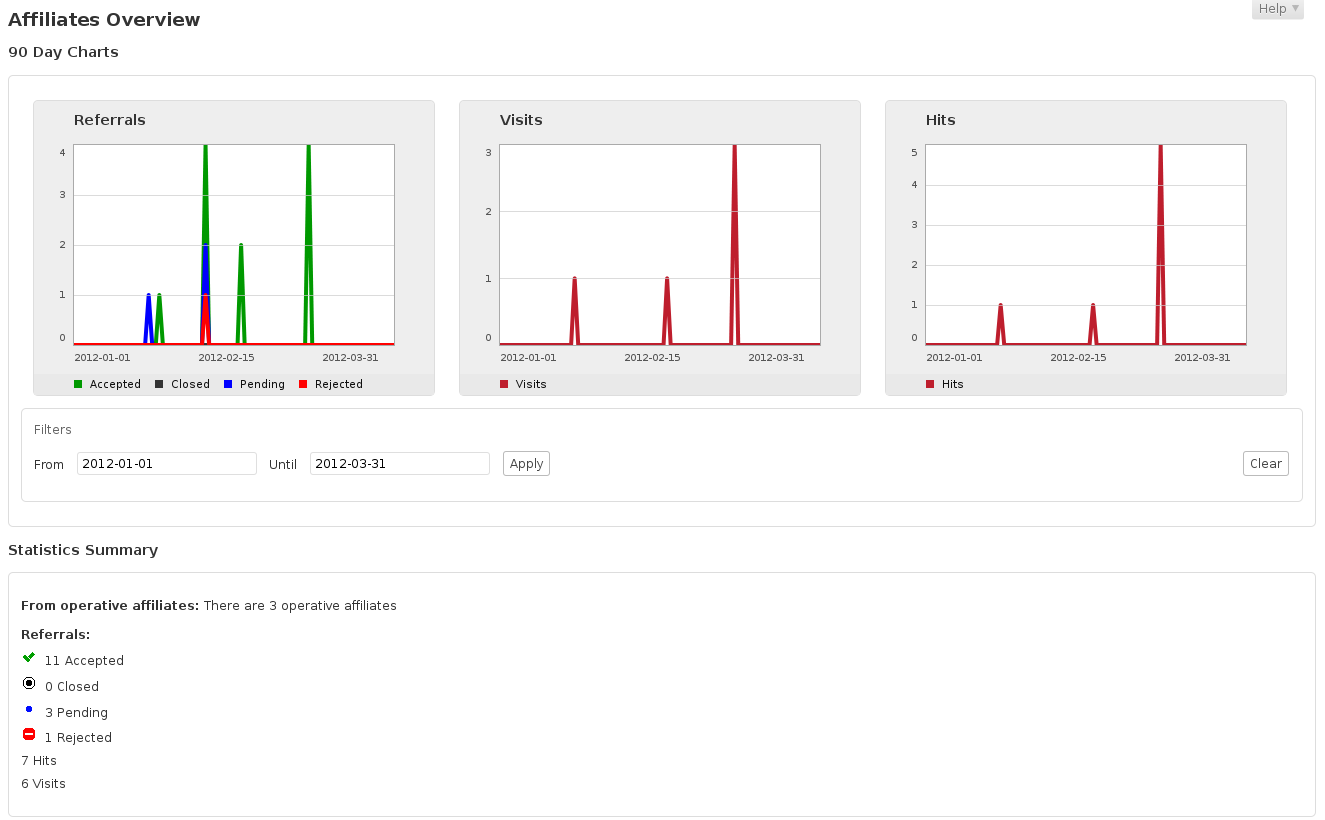
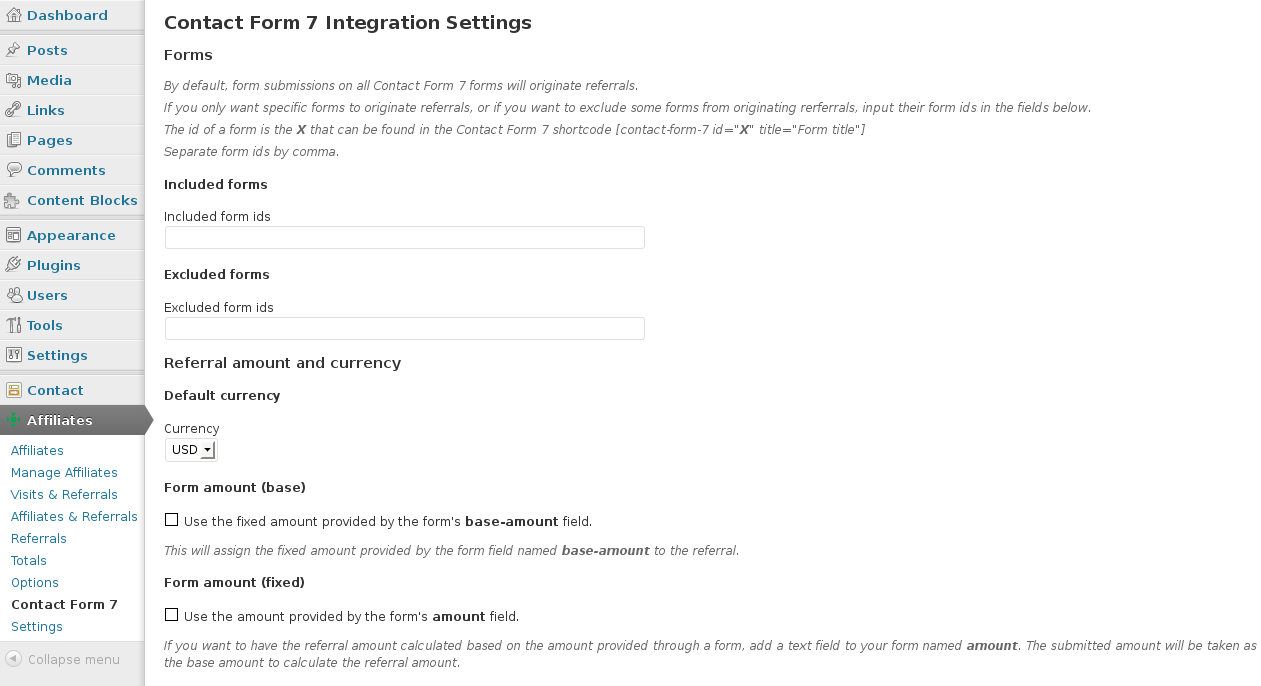
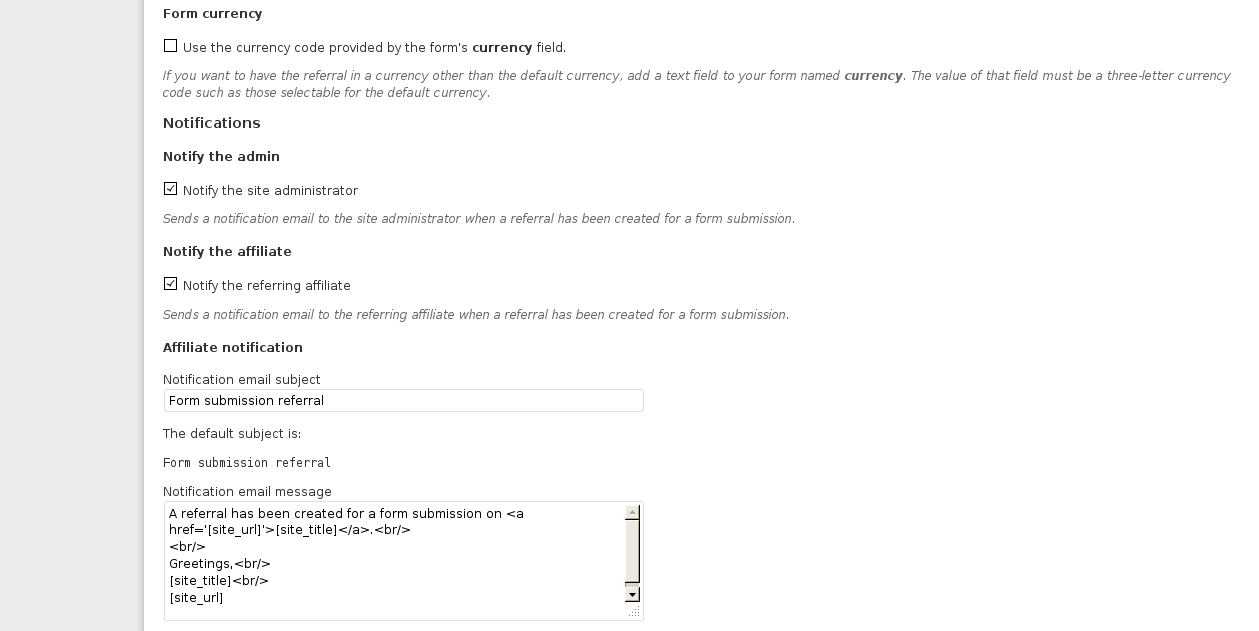
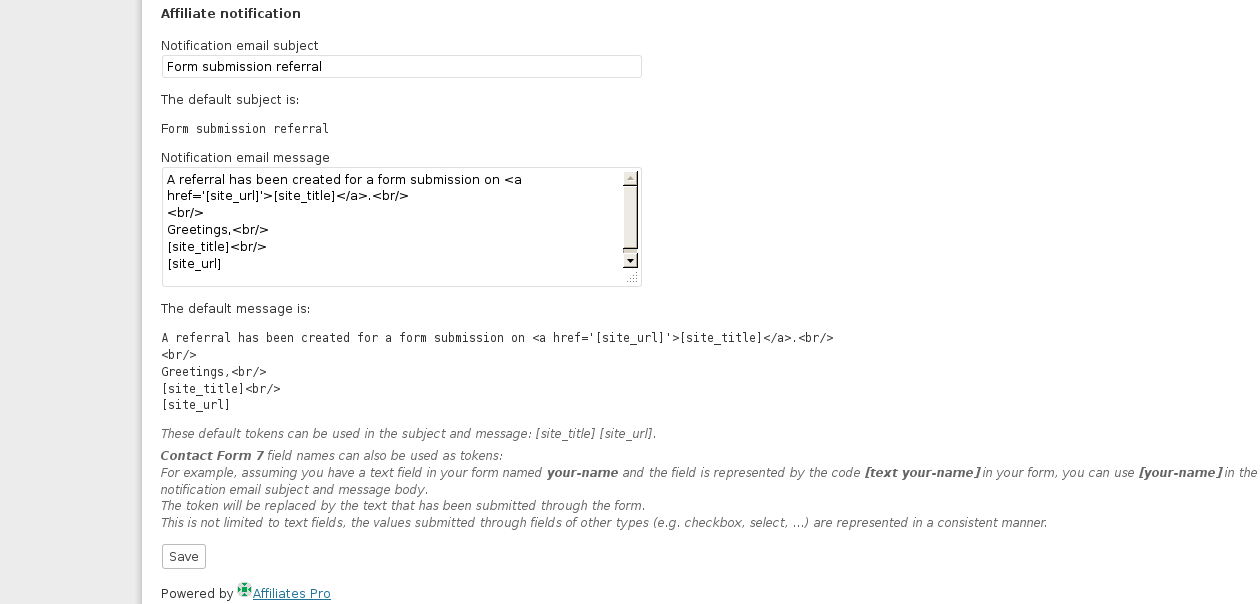
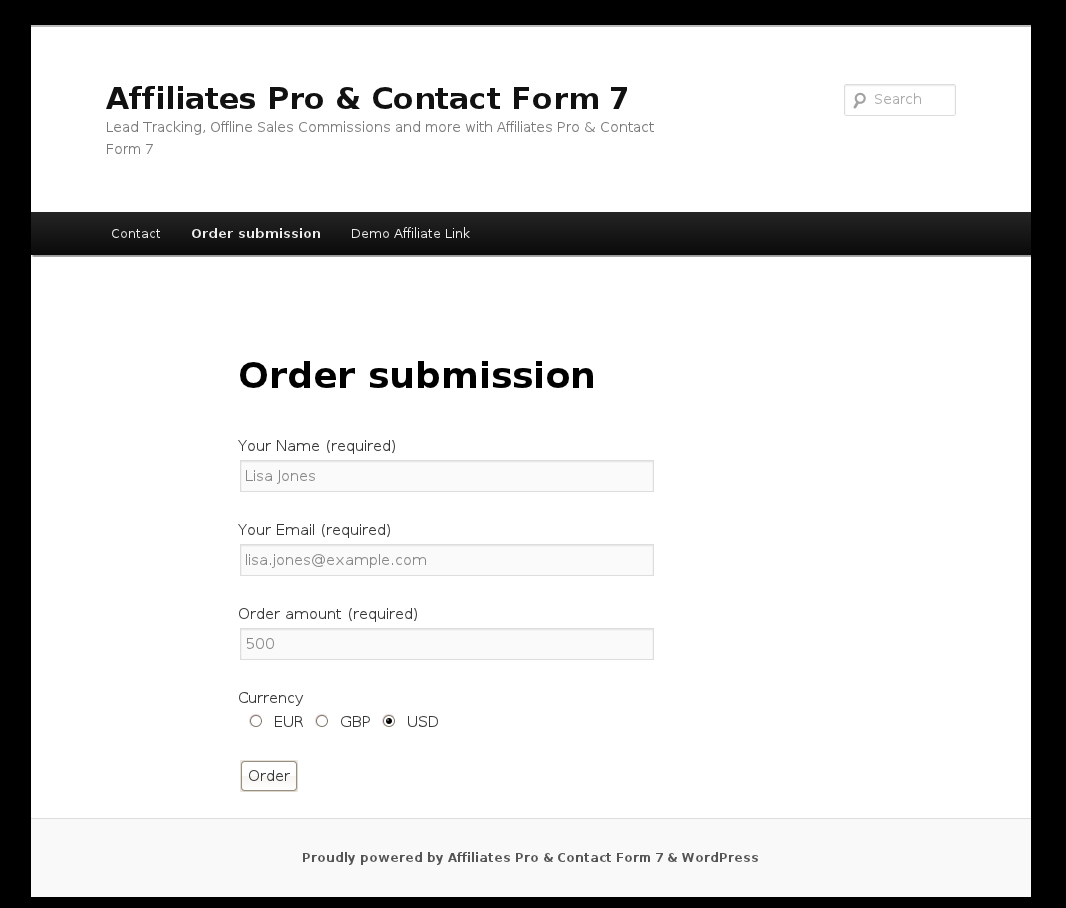
Important features include fully automated affiliate registration, unlimited affiliate management, flexible affiliate areas, automated form data collection, access to individual data from submitted forms on the back end, front end and in notifications, customizable affiliate notifications and all the standard features that already come with Affiliates Pro.
Affiliates Pro for Contact Form 7 can also be used along with any of the other Affiliates Pro integrations.
Affiliates Pro also provides a solid framework for developers, who wish to build customized solutions based on a sound data model. With unlimited affiliate program management tools available on the back end and a set of shortcodes to provide Affiliates information on their performance on the front end, there is everything you need to start an affiliate program.
Features
Also refer to the Affiliates Plugins Feature Comparison and Videos.
Real-time reporting
Referrals and affiliate link statistics are recorded and available instantly, as transactions are processed.
Integration with Contact Form 7
Data storage & referrals
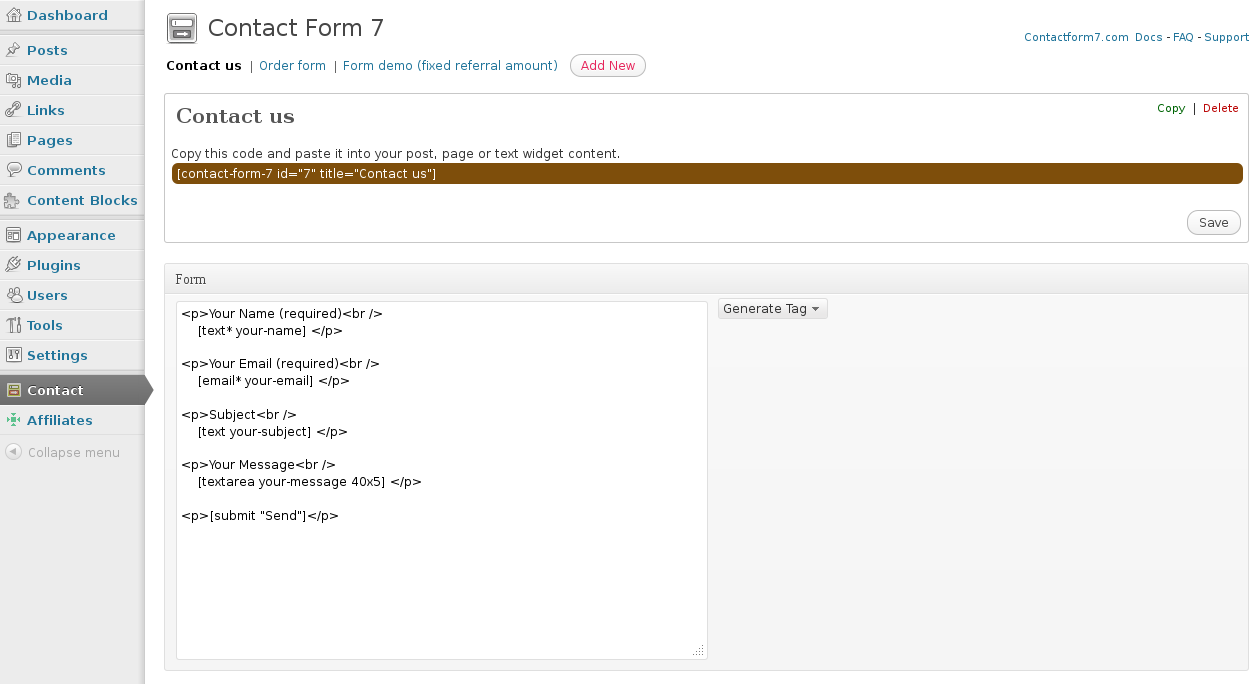
Affiliates Pro for Contact Form 7 stores data from submitted forms and tracks form submissions to the referring affiliate.
Submissions through one or more forms handled by Contact Form 7 can generate referrals. Affiliates Pro for Contact Form 7 can generate referrals for all forms, restrict it to selected forms or exclude certain forms.
Form data
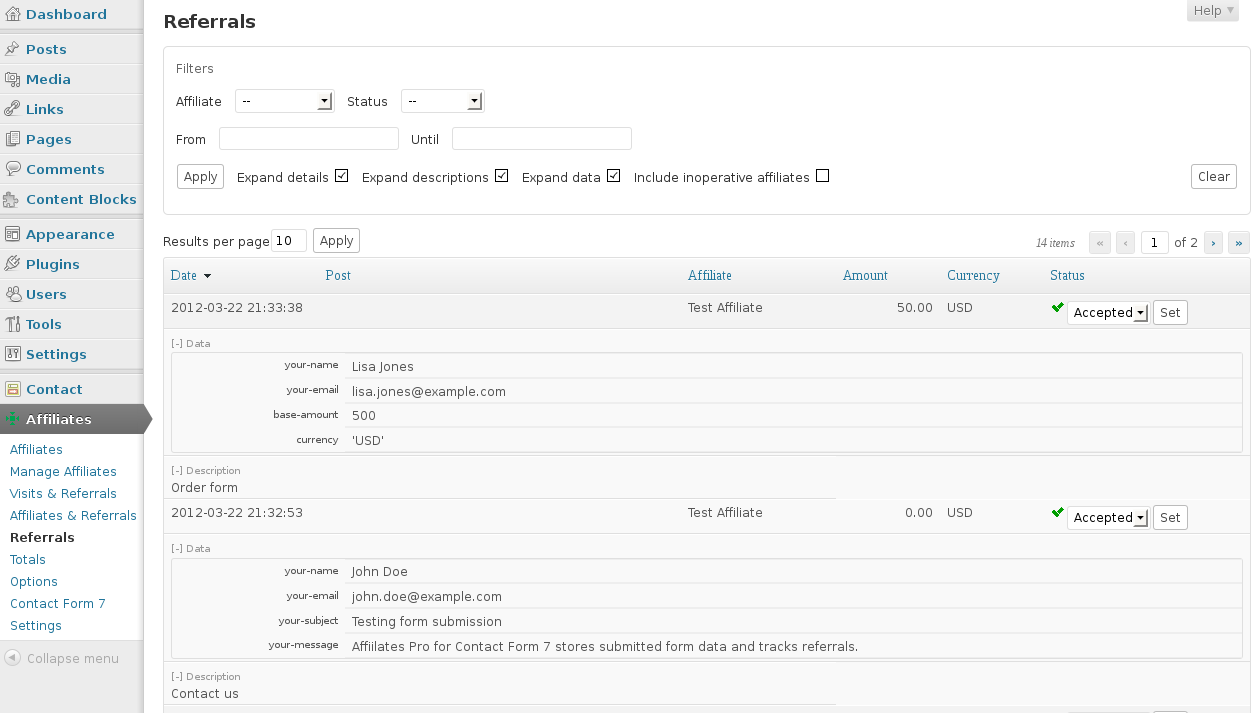
All submitted form data is stored and can be viewed on the administrative back end along with each referral. All or parts of submitted form data can be provided in notification emails to affiliates. Form data can also be displayed on the front through referral stats. This allows to display selected pieces of information for example to affiliates or sales team members.
Flexible referral amounts and currencies
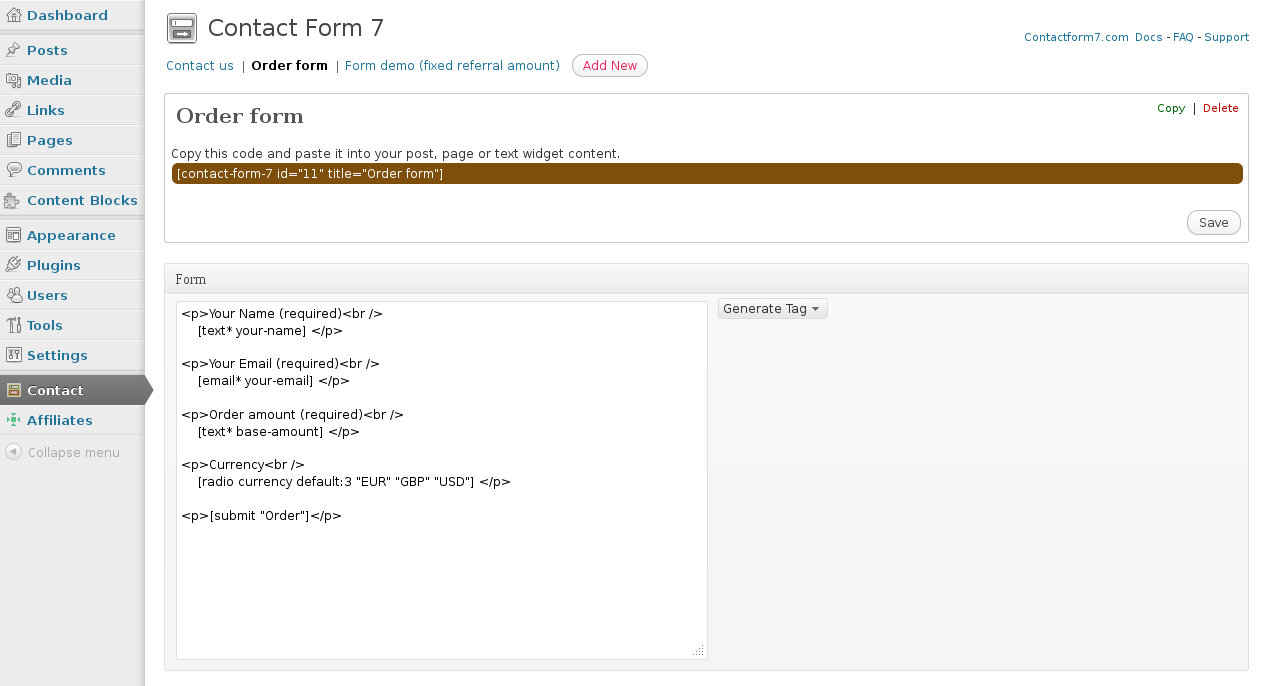
Contact Form 7 forms can generate referrals with fixed amounts, rate-based amounts or based on custom methods. Forms can provide fixed referral amount or base amounts for rate calculations. Multi-currency systems are supported by Affiliates Pro and forms can provide different currencies in each submission.
Notifications
Upon each form submission, Affiliates Pro for Contact Form 7 can send notification emails to the site admin as well as to the referring affiliate. Affiliate notification emails for affiliates are customizable and can include information provided in submitted forms.
Application Suggestions
Lead tracking
Sales leads who submit a form managed through Affiliates Pro for Contact Form 7 can be tracked down to the referring affiliate, so that commissions for offline or online sales can be credited to the affiliate. If desired, commissions that are determined upon form submission will appear as referral amounts along with each referral.
Teams
Sales and support teams can use Affiliates Pro for Contact Form 7 to delegate sales and support requests to the right team members. Create an affiliate account for each team member and use affiliate links to direct requests to each.
Unlimited Affiliates
Simply have as many affiliates as you can get.
Easy affiliate recruitment
Affiliates can sign up automatically and can also be added manually with or without user accounts.
Fixed, percentage or formula based commissions
Referral amounts can be flat rates, percentage of net sales amounts and based on custom formulas.
These can be set in general and per affiliate.
Flexible affiliate areas
Create as many pages as you need showing affiliates their stats, banners, links, profile, etc. or let Affiliates Pro generate an Affiliate Area and customize it to your needs.
PayPal Mass Payments
Simply pay your affiliates all at once. Pay-outs can be based on accumulated totals.
Quick & Easy Installation
Upload/install and activate the plugin from your WordPress Dashboard.
Affiliates Pro provides the right tools to increase sales through your site’s own Affiliate Marketing Program.




i still used this plugin contact from 7
Great, a useful combination 🙂
Hi Kento
I don’t run an affiliate program for the moment, but I would like to know if one of your plugin will suit as an affiliate ?
My goal is when the customer click on the contact form the link will be tracked.
Thank you
Hi Daniella,
Yes with Affiliates and the CF7 integration you can track that and it also gathers the form data.
Cheers
Hi Kento
Did you mean Affiliates or Affiliates Pro plugins with CF7 integration? To track affiliate link when customers send the contact form?
Also I would like to know where do I get support once I buy the plugin?
Thank you
Hi Daniella,
I mean both – chances are you won’t need Affiliates Pro, it depends on what features you want to have integrated, but I would really recommend to first use the free Affiliates plugin with its CF7 integration. We provide free support on that and premium support on Pro and Enterprise, see Support for details on that please.
Cheers
Hi Again
Sorry, something I did not understand . Do I have to download only affiliates or affiliates and CF7 integration?. I already downloaded contact form 7 plugin.
What do you suggest please
Thank you
Sure, please follow Setup and CF7 integration setup.
I did read the documentation and still does not say if I have to download contact form 7 integration in addition to Affiliates plugins.
Apart of this when I want to download the contact form 7 integration from wordpress the title is affiliates contact form 7 integration is that it? Sorry I am a little confuse here.
Now I know that I have to download affiliates plugins , but should I download the one I mentioned above also (affiliates contact form 7 integration )?
Thank you again
Yes exactly, you need to add the integration for Contact Form 7 – http://wordpress.org/plugins/affiliates-contact-form-7/ – if you go to Plugins > Add New and search for “affiliates contact form 7” you will find it easily and can install it directly.
I have installed affiliates with contact form 7, all I need it to do is allow new affiliates to register, then assign that affiliate their own id for a lead form, that their clients fill out on our site. Can this be generated automatically with this plugin? So with contact form 7, I just want when someone signs up, it gives them a link for their own form to have their clients use, and then I just want the affiliates to be able to see how many people have signed up using their form, and I want the whole process to be automated.
Hi Derek,
You can already try it out using the free Affiliates plugin and the Contact Form 7 integration.
Cheers
Hi,
I’m trying to get the contact form to include the referral id, is this possible?
Or is the only way to check referrals made via contact form through the wordpress control panel?
Thanks.
Hi Sam,
The referral ID can’t be included in the form as it is generated upon form submission. You can see the referral data if you check the additional filters as these are stored with each referral under Affiliates > Referrals.
Cheers
Hi Kento,
Thanks for the response.
Is it possible to send approved messages to the referrer? Or to automatically forward messages to them upon form submission?
Thanks,
Sam
You’re welcome 🙂
With Affiliates Pro and Enterprise you have an additional section for Notifications available. The CF7 integration allows to use tokens with the notifications:
Please have a look at the Notifications section in the documentation for more details.
Cheers
Thanks for the reply Kento, but from that I’m not understanding a way to send the complete client message to the affiliate, or is it only possible to make them aware that someone has used their referral link but not possible to see the body of text?
Hi Sam,
You can include all field contents using tokens, the screenshot is cut here in the comment, if you have a look at the image itself you’ll see the complete text which explains it. So if you have a text field with a message body named
message-body, you could use[message-body]in the notification template defined in the Notifications section.I purchased Affiliates Pro & Contact Form 7 Integration.
Q: I need to assign the messages submitted through the contact form to the referring affiliates so if the visitors are converted to customers, the affiliate is getting their ongoing commissions from offline purchases. How do I do that?
Hi Marco,
Please review the settings and information under Affiliates > Contact Form 7, basically you can use a field to identify the amount which is used to credit affiliates with a commission on the referral. You can also use it to identify customers who have been referred by an affiliate in case you want to grant commissions manually later on. Please post a topic in the Forums if you need any help with the setup in the section I’ve mentioned and include your current settings used.
Cheers
I’ve already installed Affiliates Pro 2.7.0 + Contact Form 7 3.9.3 + Affiliates Contact Form 7 Integration 3.1.0
but wordpress shows me this message:
The Affiliates Contact Form 7 Integration plugin requires an appropriate Affiliates plugin: Affiliates, Affiliates Pro or Affiliates Enterprise.
And No integration between Affiliates Pro and Contact Form.
If I delete Affiliates Pro and install Affiliates free, integration is OK and I see the submenu Contact Form 7 on Affiliates menu.
Why? Could you please help me?
Thank you very much
Hi,
please be sure your Affiliates Pro folder is “affiliates-pro” in wp-content.
cheers
That is! Thank you very much!
Hi, I have purchased the plug in ,it’s very great!but I ‘ve some question about it:
1) I really don’t understand about the setting of calculation and CF7 form format setting ,exclude the user information what should i need to ready ,like base-amount and others. Do you have any detail of this setting documentation or example ? Because I can’t find this.
2) Is it the CF7 needed to setting fix base-amount which to calculate the commission ? Because I have different promotion on my site every week ,so that the pricing is different ,can you recommended me what is the easier way for me ,I think I just no need to change the pricing every week .
3) I’ve setting the “Notify the site admin when a new affiliate is registered ” but I never received any notify email ,is it something wrong about my CF7 form setting ? My CF7 just pasting this : [number* base-amount min:1]
[text amount”10″]
is it something wrong for me ?
Thanks
Hi, the base-amount field would be a field you add to your form, you have to add that field to the form where it should apply. If you need to change that on a weekly basis, you would have to change the field value when appropriate.
Example form:
[number* base-amount min:1][submit "Send"]
Go to Affiliates > Contact Form 7 where you must enable the option under Form amount (base).
If you only want referrals for that form, make sure you have included the form ID on that page in the field “Included form ids” under Included forms.
The other settings depend on whether one uses Affiliates or Pro/Enterprise, the integration recognizes that and will offer appropriate settings accordingly.
Regarding notifications, you should check if the notifications end up in spam and if your email settings are correct. Also a recommendation is to use SMTP, see http://www.itthinx.com/useful-plugins for that as well.
If you are using Affiliates Pro or Enterprise and need further help on specific settings related to those, please post a topic in the support forums, if posting a topic, please provide more details on your settings along with it.
Hi,
I’ve purchased the plugin.
How do I send notification to my affiliate with the contact form 7 details?
Hi,
please have a look to this comment.
cheers
Good day,
I am a little confused about which plugin to purchase. There are so many options. I want to integrate with WooCommerece, and I also use Contact Form 7. I would also like to have coupon capability for affiliates.
Do I need to purchase the Affiliates Pro for WooCommerece Integration pack AND the Contact Form 7 Integration pack, AND the Coupon Integration pack or is it all included in the Affiliates Pro for WooCommerece Integration Pack?
If it is not included in the Pro, are they included in the Enterprise? I don’t need the other options that come with Enterprise; just the options mentioned.
Lastly, does the WooCommerce or Enterprise integration pack allow me to use names for the affiliates as your $19 plugin allows?
Thanks
Hi Andrew,
You can use the WooCommerce integration pack and install the CF7 integration from the dashboard. In this case I don’t see a need to get the Enterprise version. The Affiliates by Username extension is a separate purchase.
I hope that makes it clearer 🙂
So if I hear you correctly the admin and the affiliate would get a copy of the contact form if referral notification is enabled. I would need to purchase the Contact Form 7 Integration module? If the visit is not from an affiliate referral the contact form would forward the form to the admin as usual?
More or less, but note that the notifications are different. You have notifications that are sent out by CF7 and there are notifications that can be sent out by the Affiliates Pro plugin. The messages that are sent are different.
We are using Affiliates Pro and WooCommerce integration. If we add Contact Form 7 Integration will it allow the contact form on our site to forward the email to the affiliate of the site visitor and not to the admin of the site. If a visitor to the site has not been referred by an affiliate link then the form would email the administrator as usual.
Thank you
Hi Jim,
The admin notification on form submission would be the usual one, it’s independent from the notification that the affiliate receives. If referred, admin would get the form notification and the affiliate would get the referral notification if enabled.
I’d suggest you run a few tests with both integrations enabled so you can see exactly how the referral notifications would look like at the receiving end.
Also, is it possible not to notify the admin or person designated in the form if it is from an affiliate referral so the admin is not bothered? Or does the email the admin receive show that it was also sent to the affiliate?
No, that is configured in general. I.e. you would either allow admin notifications on all referrals or not, but not individually per form.
Hello, I am looking to get affiliates pro integration for easydigitaldownloads, I also need the one for contact form 7. Do I have to purchase each one separately for the integrations to work? Or can I just purchase one license for both? Please advise. thanks
Hi,
you can buy Affiliates Enterprise and you would have both integrations and more integrations/funtionality.
cheers
I don’t have any info (website was built by a teenager), messy. If there was a license would there be a notice of upgrade available/ there is no such notice.
Ok, I would advise to buy a license then, there’s nothing pointing towards a purchase for the site that I could find either.
Can you confirm if this site has an Affiliates Pro License and Contact form 7 Integration license? I’m not familiar with these plugins (I inherited management of this website) and I can’t tell if they are licensed. (I want to do the right thing)
Thanks for asking, do you have an order number for it? If yes, we can trace it back and grant access to the account that was used in case credentials were lost. If not, it would require a new order.
I see this message at top of Affiliates options page: Missing argument 2 for wpdb::prepare(), called in /home/content/e/t/e/eternalreefs/html/wp-content/plugins/affiliates-pro/lib/core/affiliates-admin-options.php on line 213 and defined in /home/content/e/t/e/eternalreefs/html/wp-includes/wp-db.php on line 992
Hi Frank, that looks like an older version of Affiliates Pro is installed, in one of the more recent versions of WordPress, that prepare method changed and the newer versions of the plugin have been taking that into account. In other words, update 🙂
hello, I would like to create contact form with multiple affliate ID so when the person fill in the form, the detail of the form will go to the person with specific affliate ID, which plugin/package shall I buy. Please advise and contact me by email.
Hi,
do you only need send form’s details to specific affiliates?, and also need to create a commission and send details to the affiliate who referred.
cheers
Hi Viviana,
The CF7 integration package contains Affiliates Pro and the integration plugin. The integration plugin allows to notify affiliates when a form has been submitted by a user they have referred. It allows to use field names as tokens which are substituted by what the visitor has provided in the form.
I’m testing my form and for some reason my test account is receiving two emails…
#1 – is from the contact form email address with Notice as the subject
#2 – is from wordpress with the information I set up on the contact form 7
How do I remove the first ‘notice’ email so the affiliate will only receive one notification email?
Hi,
you can try disable “Notify the site admin when a new affiliate is registered” in Affiliates->Options
cheers
Thanks for the idea but that option is not currently checked.
The extra email is not going to the admin, both are going to the affiliate…?
Hi,
sorry, you must uncheck “Enable notifications” in Affiliates->Notifications
cheers
if order via Contact Form 7 or on form order which already Integration with affiliates Pro plugin, on members who have signed up pogram affiliate, whether will get a commission ?
thanks
Hi,
yes, a form send by Contact Form 7 create a referral. You can setup in Affiliates->Contact Form 7 menu.
cheers
how we integrate your affilate plugin with our proprietary lead forms?
There is an example of how to record referrals in the API section of the documentation. Also there is an example widget implemented that you could use to derive the code for your forms.
How do you access the stored data from the contact 7 forms?
If you just want to see it, you can check the options in the Referrals screen to expand the data as the field values are stored and displayed there. Is that what you are looking for?
Are there any differents in functions, stat, etc, if i use the refferal url: mysite.com?affiliate=1 or the pretty mysite.com/affiliate/1
Not really.
But the problem is that it do not shows the url where referral was created. Only url for the affiliates report-page.
I see, I’ve just tested it creating a test account on the site. Would you mind granting access to the back end to have a look?
Sorry. I just rambles there about the attribute. It can only be true ore false, as I understand now.
I use this shortcode:[affiliates_affiliate_stats type="stats-referrals" data="message" show_pending="true" show_post="true" show_amount="false"/]
The problem is that the referral page do not shows in the post column. Only the same post-url as the refferal report. See the dump:
http://media.imobiler.se/2012/12/rapporer_dump2.jpg
That’s correct, this shows the page where the referral was created.
The Detailed referral overview looks great and what I need. But I am not sure how to make the attribut: “show_post” to show title and link to the page with my contactform.
At the moment It shows only title and link to the same page where it is. Same link to every refferal line.
The Post column on the Referrals admin page links to the page where the referrals are created, but what do you mean by the show_post attribute?
Thank you Kento for quick respons and useful code!
It work perfect. With the Settings; Default referral calculation to “referral rate” and Default referral calculation value “1.0” – to give the same comission amount I set hidden in a specifik form. Shows fine in my admin and the affiliates personal reports.
(And of course Contact form 7 settings “Form amount (base)” enabled).
Thanks, glad to hear it’s working for you now 🙂
I tried this and make a hidden form field with the plugin, like this: [hidden base-amount-154 “150”]
But the form don not send any amount value (“150” to the referreals result page. (Shows only 0.00 in report).
It works with settings “Default referral calculation value” (same amount for all forms) but not from the specifik form. So I gues I do someting wrong with the formfield creating. There are no “Amount” pree defined fields. I have tried “Text field” with no results from submission in reports.
There are two problems with that, first there is no hidden field in Contact Form 7 (but see my note below) and then you have named the field base-amount-154, the name must be base-amount.
I’ll better give a working example:
Your name : [text* your-name]<br/><div style="display:none;">
[text base-amount "50"]
[text currency "USD"]
</div>
[submit "Send"]
So instead of using a real hidden field, it hides the fields from view 🙂
Note that Contact Form 7 still doesn’t support real hidden fields (unless you use another plugin like Contact Form 7 Modules but that doesn’t work with this – yes I tested it).
To make the guestion more clear: With the “amount” in forms means the commission to affiliate. (Just contact forms).
If you want to grant a specific amount then you would provide that through a field named
amounton each form and assign it a value corresponding to the referral amount.Hi Kento
I want to use som diferent amount fore diferents forms provided by the form’s base-amount field. But can not find out how to do it. It shall be hide for visitors. (And generate a comission amount that in affiliates report).
You would add a hidden field named
base-amounton each form and enable the option Form amount (base) in Affiliates > Contact Form 7.must i buy affiliate pro before i can buy the contact form 7 integration?
if i use the free affiliate, can i work with the contact form 7 integration?
You just need to get the integration pack with Pro included.
I can not adjust the price for each form, help!
Can you please give an example / screenshot of the form and explain what exactly you would like to achieve?
Hi Kento,
Can the Affiliate be included in the form notification email? The referral url is there but this doesn’t work if someone leaves the site or clicks around the site and is referred internally.
Thanks
You can include the affiliate in the default notification email that Affiliates Pro provides. It also records a referral for the affiliate when the form is submitted after the visitor has been referred by the affiliate.
Geez! Right in front of me. Thanks!
So I’m wondering if there is a way to turn off the referrals going to “Direct”? In other words, if someone arrives at my site, but didn’t use an affiliate’s special url, I would rather it not track anything. Possible or no? I’m just worried about too many of these being added to the database. I hope that makes sense. Please let me know if I need to clarify. Thanks as always!
You can turn that option off, it’s this one in Affiliates > Options : Store direct referrals 🙂
Hey Sir! Works great! Doing exactly what I need! Sending you something via paypal! 🙂
Hey thanks 🙂
Hi Kento,
I just wanted to get a confirmation that this plugin will work together ok with your WP Ecommerce integration plugin. I’m using the WPEC one now, but will need this one to track referrals to Email Sign Ups. Thanks Alot!
Yes they will work together, the integrations are independent. Let me know when you’ve tried it.