
Your cart is currently empty!

Open Graph Protocol Framework
Download
Download the free Open Graph Protocol Framework plugin for WordPress.
Description
The Open Graph protocol enables any web page to become a rich object in a social graph. For instance, this is used on Facebook to allow any web page to have the same functionality as any other object on Facebook.
This WordPress plugin is aimed at automating the process of adding basic and optional metadata to a site’s pages. It is also designed to act as a framework for other plugins or themes and allows to modify and adapt the information provided as needed.
Usage
Install and activate the plugin. It will automatically render the following metadata for posts, pages, etc. :
og:title: The page’s title is used, this provides the title for posts, pages, archives etc.og:type: The type will bearticlein general,websitefor the front page andblogfor the blog homepage.og:image: For post types that support featured images, the URL of the featured image is used. Additional metadataog:image:widthandog:image:heightis added.og:url: The URL of the current page.og:site_name: The name of the site.og:description: Uses the full excerpt if available, otherwise derives it from the content. For author and archive pages, the type of page and title is used.
Filters
This section is for developers. If you’re not a developer, you can safely skip it.
The plugin provides the following filters:
open_graph_protocol_meta
This filter allows to modify the value of the content attribute for a given meta tag. It is invoked for every supported type of metadata.
Parameters:
stringcontent– the current value of thecontentattributestringproperty– the metadata name, for exampleog:title
Filters must return:
stringthe desired value of thecontentattribute
open_graph_protocol_meta_tag
This filter allows to modify the actual HTML <meta> tag that is rendered in the <head> section of pages.
Parameters:
stringHTML<meta>tagstringproperty– the metadata name, for exampleog:titlestringcontent– the value of thecontentattribute
Filters must return: – string the desired output for the HTML <meta> tag
open_graph_protocol_metas
This filter allows to add or remove metadata before it is rendered.
Parameters:
arrayof metadata indexed by metadata name
Filters must return: – array of metadata indexed by metadata name
open_graph_protocol_echo_metas
This filter allows to modify the HTML that renders the plugin’s meta tags in the <head> section.
Parameters:
stringHTML with<meta>tags to be rendered
Filters must return: – string HTML with <meta> tags to be rendered
Why this plugin?
This plugin was created because we needed an extendable way to render meta tags based on the Open Graph protocol, which would allow to modify the meta tag content rendered or add meta tags when appropriate based on external data.
None of the existing plugins provided a sufficiently flexible way of doing that, among other reasons we needed a solution that would comply with all of these requirements and none of the existing solutions does:
- must be compatible with WordPress 3.5
- must automatically add meta tags for featured images
- must be automated and create sensible meta tag content for each page, we don’t want to manually indicate the tag content for every page
- must provide a framework for extension through hooks and filters on every tag, and provide a design that allows other plugins to modify the meta tags in flexible ways
- must not ask to provide your Facebook account details or application ID when there is no need for it
- must not be bloated with features you don’t want or need when you simply want Open Graph metatags to be rendered automatically for your pages
affiliates Facebook linkedlin meta meta tag meta-tags ogp Open open graph Open Graph Protocol pinterest Share sharing social social network tag tags twitter
Comments
86 responses to “Open Graph Protocol Framework”
-
Hi – I have added and activated the Plugin but I am not seeing the OG meta data in my source code. Am I missing it? Or is there something else I need to do?
Site: acclivityinc.com
Thanks
-
Hi Paula,
Thanks for using the plugin! You don’t need to do anything, the system will just add the
metatags in the HTML for you automatically. If you use the Inspector in Firefox for example, you will see them (search forog:in the Inspector when viewing a page).Cheers
-
-
Thank you for sharing this great thing. It will be very helpful.
-
Thanks for your kind comment, I’m happy to hear that!
-
-
After installing, where can I find the plugin? I can’t find it…
-
Hi Ryan,
It will automatically render the following metadata for posts, pages, etc.
Kind Regards,
Antonio B.
-
-
Hey thanks for developing this plugin!
Thank you so much! -
Hi Kento,
First off this is such an amazing plugin. I just have one question, I am trying to post to Telegram Application and the font is very small, is there a way that I could edit the font for the output?
Thanks
-
Hi Nazanin,
Many thanks for your kind feedback, great to hear you like it! If you would like to use a bigger font, you can edit your theme’s CSS or better derive a child theme where you customize your CSS. See Child Themes for more details please.
Cheers
-
-
If you look at the source of this page, all of the OG tags are there, but when you Facebook debug it, it’s gives a Curl timeout error and obviously wont pull in the thumbnail, title, and description:
http://www.proudcons.com/breaking-new-establishment-gop-candidate-has-been-nominated/
Any ideas?
-
Hi James,
If I input the URL before sharing, it comes up with an image related to the post so that seems to work. I don’t get any error but a link to the image BUSTED-11.png is recognized which seems correct, too. Probably what you saw was related to a previous version cached?
Cheers
-
-
I’m struggling getting the filter to work. I want to add og:image with a custom argument $image_url.
I tried this:
add_filter( ‘open_graph_protocol_echo_metas’, ‘sendopengraph’,10,1);
function sendopengraph($image_url){
$metas=””;
return $metas;
}
but it returns nothing…-
Unfortunately part of my string got cut when posted… But even this sends nothing:
add_filter( ‘open_graph_protocol_echo_metas’, ‘sendopengraph’);
function sendopengraph(){
$metas=”og:image hello”;
return $metas;
} -
Hi Blaise,
I would rather recommend to use the
open_graph_protocol_metasfilter instead, as it allows to add metadata before it is rendered. The one you are using could be used to modify the final output, which is also an option but could clash if there already is an image defined. You can find more info on the filter on this documentation page.Cheers
-
Hi
Thanks for your answer. I tried this as well and I’m not passing any value. What is the exact code I should enter?-
Hi Blaise,
Like this, you need to implement getting the image source, width and height appropriately:
add_filter( 'open_graph_protocol_metas', 'open_graph_protocol_metas_alter_image', 10 );

function open_graph_protocol_metas_alter_image( $metas ) {

    global $post;

    list( $src, $width, $height ) = ...; // @todo get image source, width and height for this $post

    $metas['og:image'] = $src;

    $metas['og:image:width'] = intval( $width );

    $metas['og:image:height'] = intval( $height );

    return $metas;

}
I hope that helps you to get started, it’s pretty simply and you just need to get the image data desired for the post when the filter is processed, thus the global $post.
Cheers
-
-
-
-
Recently when I share a post to Facebook from my iPhone, it will no longer display the featured image. It seems to work fine from my laptop though. Can you help?
-
Hi Erin,
please give us your url to test it.
Thanks,
Antonio B.-
-
Thanks Erin,
I’m testing http://www.thislittlelightofours.com/five-for-friday/ and works fine with:
Mac firefox
Windows Phone iExplorer
Android Navigator
Iphone 5 Safari
I have test the webpage using the share button below the post content.
Kind Regards,
Antonio B.-
Thank you, but I need to be able to share it from a hyperlink because using the share button will post it to my personal Facebook page, which isn’t what I want. Is there a chance you can test it that way? I appreciate your help.
-
Hi Erin,
writing the link directly, the same result: http://i67.tinypic.com/2dp35h.jpg
Maybe it’s depend of the iphone settings, really I don’t know why.
Kind Regards,
Antonio B.
-
-
-
-
-
-
Hello! Is there a way to remove the site_name from the feature title (or put a divider like | between the title and site name?)
Right now on Facebook a link will include the feature’s Headline + Site Name without a space/division.
Thanks!
Z
-
Hi,
I’ve tried it on this post http://sprudgewire.com/?p=452 but don’t seem to get the same thing you describe, looks ok here. Have you changed anything since then?
Cheers
-
-
When I post a link (http://www.eighty20paleo.com/mornings/baked-goods/orange-cranberry-muffins) on Facebook, the description doesn’t have any punctuation showing up (here is the description -“There is just something about a orange cranberry muffin that I absolutely love Maybe it s the fact that I love muffins for breakfast or maybe it s just because I…”)
Do you have any idea whats going on? And how to fix it? Thanks.
-
Hi Jessica,
Looks ok here
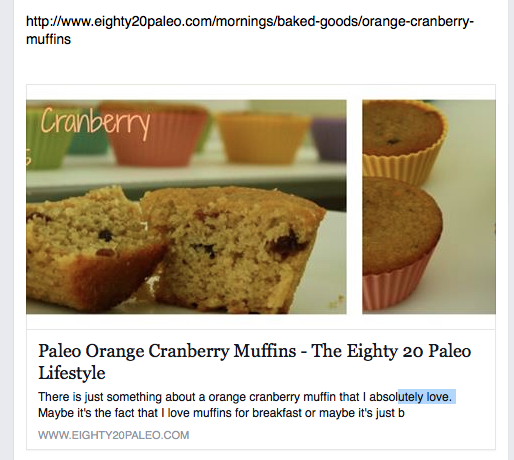 – maybe it was a filter from some other plugin?
Cheers
-
-
Hi. I want to use your plug-in, but I’m not sure if it will work for me. I do not use featured image. Have you updated the plug-in to allow us to choose an image from our media file or from the post? Thank you!
-
Hi, thanks for asking, this hasn’t been included yet but is pending implementation.
-
-
How the heck do I uninstall this plug in from my WordPress blog site? Unlike other plugins, this one does not show an uninstall button.
-
Hi,
you must deactivate it, then you should have a “Delete” button.
cheers
-
-
Just installed the plugin on our dev site and works great. Is there an easy way to get other tags such as og:author to be pulled in automatically as well?
-
Hi Luis, yes, you could use the filters to add additional tags needed. See http://www.itthinx.com/documentation/open-graph-protocol/ for current filter hooks.
-
-
Great plugin! Only problem I have with it is that I have a page with a wordpress shortcode, and the plugin put the shortcode in the og:description-tag, instead of the actual content it generates.
-
Thanks Kristoffer 🙂
What shortcode and plugin are you using please?
-
-
Hi there,
I’ currently building a new website with your OGP plugin and I think I’ve found a bug.On 404-pages I get this in the :
Notice: Trying to get property of non-object in /var/www/html/web200/html/janbrinker_dev/wp-content/plugins/open-graph-protocol-framework/lib/core/class-open-graph-protocol-meta.php on line 67And because it’s not wrapped in some tag my visitors would see it at the top of the page.
I’m running WP 3.8.2 and OGP 1.0.6
-
*Inside the head-tag.
And you don’t sanitize your comment-inputs 😉-
Not sanitized? Enlighten me please 🙂
-
-
Many thanks for pointing that out, fixed in 1.0.7 just released.
-
-
Any thoughts as to why LinkedIn still doesn’t pull images when sharing WP blog pages that seem to be tagged properly? Thanks in advance for any assistance.
-
It looks like your og:image is correct, have you tried asking them if they know of any issues related to their system not recognizing images?
-
-
I found the problem. While following the steps to use google authorship I added “Google+” to the top of the header.php file above the section. This as it turns out is a bad thing. Moving it down in the file after the corrected the issue.
-
Perfect, thanks for the update on that.
-
-
I like the plugin as it’s very simple to use. My problem is that the open graph tags end up in the body instead of the header. Any idea why?
-
Thanks Brad, I’ve had a quick look on a page but can’t see any of the og:* tags in the body.
-
-
This looks like the plugin I’ve been looking for, but I’m at a loss to find the settings option on my dashboard. Am I just being dense?
-
Hi Ian,
It doesn’t have a settings page (yet) – up to now with what it offers it’s not needed, but the plugin has filters that allow to customize things. If you’d like to have a look at those, see its documentation please.
-
-
I just I want to say thanks
I been looking over tree hours for a plugin that would work as it does Open Graph ProtocolThanks
-
Many thanks William 🙂
If you can spare a couple of minutes you can also post a review, I appreciate the feedback.
-
-
I installed the plug in, but when someone shares to Facebook the words “About SHARE!” appear as the description instead of the actual article description. Click on the below article URL and share it to Facebook, you’ll see what I mean.
http://www.growmyrevenue.com/3684/how-to-increase-sales-the-smart-way/
Where is the setting in WP that allows me to set what is pulled for the description? I have NO IDEA where it is getting the text “About SHARE!”
-
It looks in various places, first place for a post is the excerpt, is it that?
-
-
I think this is exactly what I’m looking for, it instantly fixed my Pinterest sharing however I’m still having trouble with Facebook. I’m VERY new to trying to code my site myself so it’s probably something very easy and small. When I check FB’s debugger, I get this: https://developers.facebook.com/tools/debug/og/object?q=http%3A%2F%2Fjoshuatrent.com%2Frosemary-sweet-potato-fries%2F
It’s still pulling the wrong image and saying I don’t have proper meta tags. If anybody out there can help, I greatly appreciate it!-
Hi Joshua,
These fries look yummy, 5* from me 🙂
But the markup has issues – you should fix what’s causing issues with the markup, for example the ‘Stray end tag head’ validation error, probably some unclosed tags in there?
-
-
Thanks for your plugin. My WordPress site is now sporting proper og tags.
Now my problem is the linkedin won’t show a image when I share.
There troubleshooting site says that they want specifiy width and height also. Specifically this: og:image width > 150 && og:image height > 80
Is there a way for me to edit this?
Here is a link to their specifications are here if you choose to help me dig into this problem.
Thank you.
Julie
-
Thanks for your feedback Julie, the width and height metas are based on the attachment image width and height and created automatically. Maybe it’s a problem of the validator they use? The meta tags seem to be created fine normally.
-
-
Great plugin. Thanks!
It would be nice if you had a bit of customization.Particularly, I would like to be able to choose an OG image – I like to create one that may or may not actually appear on the page, but rather one which is a composite of site images or an attractive summary image to pull people to the page.
Anyway, awesome job!
-
Many thanks for your feedback! It’s planned to extend the plugin so it allows you to choose a specific image (or none), I think that would be in line with what you’re saying and what others have also suggested.
-
-
Hello!
Great plugin –thank you! I am having difficulty getting my custom description to appear for my homepage. It seems like the plugin is only pulling from the surrounding text (which doesn’t exist–it’s only a slider, so the shortcode appears). On other pages, the surrounding text is fine, but I’d like for the custom description to come up on the home page.
Additionally, I updated the og-logo in my File Manager. How long does it cache usually take for the new image to start appearing?
Many thanks,
Gia-
Hi Gia,
On the home page it takes the site’s description as the default, with single entries it first looks at the excerpt and if empty, derives it from the content. If you want a specific description, you can try indicating an excerpt and it should use that for the page.
One thing I’ve noticed and wasn’t aware of before, is that it takes shortcodes and puts them in the description tag ‘as is’. That’s something that could be improved, taken note of it.
Oh, by the way, there are two entities rendering OG meta tags on your site, one from this plugin and there’s another set. Jetpack? You should have only one rendering those.
I can’t really say about the image getting updated, but try clearing the site’s cache.
Thanks for the feedback, this is useful as I’ve discovered the thing with shortcodes in the description thanks to you 🙂
Cheers
-
Thank you! I’ll try that! Cheers!
-
I’m having the same issue with shortcodes popping up in the descriptions. How would one “indicate an excerpt”?
-
Hi Megan, thanks for reminding me about the issues with the shortcodes appearing. What happens is that it looks in the post content directly and doesn’t apply the rendering process, I think that should be changed in the plugin. It might also be a good idea to at least have it as an option to use the excerpt for the description.
-
-
-
-
I didn’t see a support category for this so I hope asking here is acceptable.
Installed the plugin and it worked perfectly first try! Always a good sign. My posts will often not have images. Is there a way to set a default image to be used for the og:image tag that is used when no featured image is specified? Without one, Facebook grabs a theme-related image and I end up advertising Woothemes instead.
-
Sure, this is the right place and your question is very welcome, too 🙂
It is possible to set a default image using the filters, but there’s no setting in the user interface, so it would have to be coded as an extension (well not an “extension” really, just a function that implements the filter). Do you know how to use the filters?
-
Hi Kento, and thank you for your plugin. I have the same need as Bob to set a default image for all the pages that don’t have one. Unfortunately I don’t know how to use the filters… I’m quite tech savvy in general, so if you could point me to the right direction — if not tell me how to do from A to Z — that’d be super helpful. 🙂
-
Hi Olivier,
I haven’t had a chance to take a look at this, so I can’t really point you towards a direct solution other than what I’ve indicated about using the filters. I’d really have to take the time to draft a solution based on that … anyhow, the best would be to allow to choose an image through the user interface. Maybe that would make more sense in general.
I’d be happy to hear more feedback on the idea 🙂
-
try this…
add_filter(‘open_graph_protocol_metas’,’open_graph_protocol_default_image’);
function open_graph_protocol_default_image($metas) {
if (!isset($metas[‘og:image’])) {
$metas[‘og:image’] = ‘http://mysites.com/logo-images.jpg’;
$metas[‘og:image:width’] = ‘600’;
$metas[‘og:image:height’] = ‘600’;
}
return $metas;
}
-
-
-
-
Sorry the tag didn’t show up on my first post because I forgot to drop the tags .. I need it to generate meta property=”og:price:amount” content=”15.00″ – where the 15.00 is the price of whatever the product is on the page.
-
Yes, then the filter should really be a good idea. You would just have to pull that data from WooCommerce and add it.
-
I am pretty much a novice with this stuff. I tried adding the code to generate the tag on the product page itself rather than messing with the plugin by trying a couple code variations. I looked thru the code that supposedly generates the price on each product page but I think I have done something wrong. I tried the following two things with no success.
?php echo $product->get_price_html(); ?
and
?php echo get_woocommerce_single_product_price(); ?
One creates white screen of death. The other doesn’t break anything but the tag simply does not generate when I view page source.
-
You should rather use the filter, it seems you are simply trying to output the price somewhere on the product page. The filter will allow you to have the meta tag correctly generated when the others are rendered (at the right place on a page).
-
-
-
-
I love this plugin. Is there a way to get it to generate an open graph tag for “product” instead of “article” – I could just change this in the code I suppose. But my real question is can I make the plugin generate the following tag for Woocommerce
The price would be whatever the product price is of course. This will help with Pinterest Rich Pins. Thanks!
-
Hey thanks Matt, it’s really so nice to hear that from users! Always appreciated 🙂
You don’t need to change anything in the code, it would rather be some kind of extension based on the
open_graph_protocol_metasfilter that the plugin provides (see details on it on the plugin’s documentation page).Oohhh … WooCommerce extension idea 😉
-
-
Great plugin! I am wondering, though, how can I make the medium size image or the thumbnail the “default” image. Mostly because my featured image size is really lenghty and looks weird on facebook.
Thank you so much for an awesome plugin, though!-
Thank you so much for your kind comment 🙂 One way to achieve this would be using the
open_graph_protocol_metafilter on theog:imageproperty (also on theog:image:widthandog:image:heightproperties to set the right dimensions).Do you know how to add filter hooks?
Cheers
-
-
Now I have modified your file
class-open-graph-protocol-meta.phpin the function
public static function wp_head()to include the site description if is_home() is true
} else if ( is_home() ) {
$description = get_bloginfo( ‘description’ );I hope you will integrate this in your plugin.
-
Thanks Marc, I’ll review it and include the appropriate changes 🙂
-
-
Hi Kento,
this is a great plugin! I’ve just installed it on my blog and it works out of the box.
But one little issue I have: When I try to publish my homepage on google+ for example it shows my blogname in the description field. Everything is ok on a post page but not on the homepage.Can you change this, that the plugin uses the wordpress description field for the open graph description tag?
Thanks a lot,
Marc -
Hi Antonio,
problem is my theme doesn’t support featured images, it’s a rather old, but (internally) heavily reprogrammed theme. We look into if we can activate featured images, but it woulsd be nice if the plugin just used the first image in a post when there’s no featured image.Take it easy, Ralf
-
Hi,
maybe if you use a featured image, even though the theme doesn’t use it. I’m not sure, but you could try it.cheers.
-
-
Hi Kento,
That plugin is exactly what I was looking for, unfortunately it does not add a ög:image tag on my blog http://www.cadcam-blog.de. It’s installed since article http://cadcam-blog.k-magazin.de/?p=6372.
Any ideas?
Cheers, Ralf
-
Hi,
Open Graph protocol use for og:image the “featured image”, you must set the featured image’s post/page.cheers
-
-
Thanks for this plugin Kento this is one nice Christmas present! easiest facebook open graph plugin I have used yet. I am using it on my website http://johnrlive.com
-
Cool 🙂 Thanks for using it!
-
-
Looks like another awesome plugin sir!
-
Thank you sir 🙂
By the way it’s going to be available on wordpress.org, I’ll post an update when it’s been committed to the repository there. It will be at http://wordpress.org/extend/plugins/open-graph-protocol-framework/
-


Leave a Reply