
Author: Kento
-

How to create a Customer Mailing List with WooCommerce
In this tutorial you will learn how to create a mailing list based on existing customers from your shop. We will focus on customers who have placed orders which have been fulfilled. The requirement is that any customer that is going to be included, must have at least one completed order. As your list will…
-

Announcing the Groups Bundle
Today we have launched the Groups Bundle, an affordable extension package for WordPress membership sites based on Groups. This comprehensive extension package is designed to unlock the full potential of WordPress memberships and access control through the established Groups platform. The Groups Bundle brings together six powerful extensions that integrate seamlessly with the free Groups…
-

Goodbye 2025 Hello 2026 Release Recap
Say goodbye to a fleeting 2025 and roll out the red carpet for 2026! We end the year in good spirits. Our team has done a lot of useful work for the many thousands of users of our tools. As WordPress 6.9 “Gene” was released in December, with plans for WordPress 7.0 already in the…
-

Bitcoin and Gold Lo and Behold
In the ever-evolving landscape of finance and value storage, few topics spark as much debate as the comparison between traditional precious metals like Gold and Silver, and the digital innovation of Bitcoin. Often, discussions devolve into polarized arguments, with proponents of one side dismissing the other through finger-pointing or claims of ignorance. However, this approach…
-

The Summer of WooCommerce 10.0
It’s July and if you’re in Summer Mode you might have missed a few things 😉 WooCommerce 10.0 was scheduled to be released on the 7th but was rescheduled for the 14th. We have released WooCommerce 10.0 compatibility updates and improvements for several extensions, here is a summary: Stay tuned for more and enjoy those…
-

Restrict Payment Methods for WooCommerce
We have recently introduced a new extension for WooCommerce, Restrict Payment Methods, which allows to limit which payment methods customers can use at checkout. This extension is great if you want to limit how your customer can pay based on: You can use this to offer certain payment methods to specific classes of customers only.…
-

PHP’s isset(). Semantics? Meh.
While I was working on the definition of the parameter set for a new WordPress REST API controller, I came across something odd. Fire up PHP’s interactive shell and see for yourself: Well to be honest, when I ask you whether something is set, I expect you to tell me if it is set, whatever…
-

WooCommerce Product Editing – Catalog Visibility “Hidden” is not what You might think
When you edit a product in WooCommerce, you will find the Catalog visibility setting in the Publish panel. This setting offers several choices: Shop and search results, Shop only, Search results only and Hidden. But, what do these mean? So Hidden doesn’t really hide the product, from what we know, it would rather appear as…
-
How to customize the WooCommerce Product Catalog Template with Search and Filter Blocks
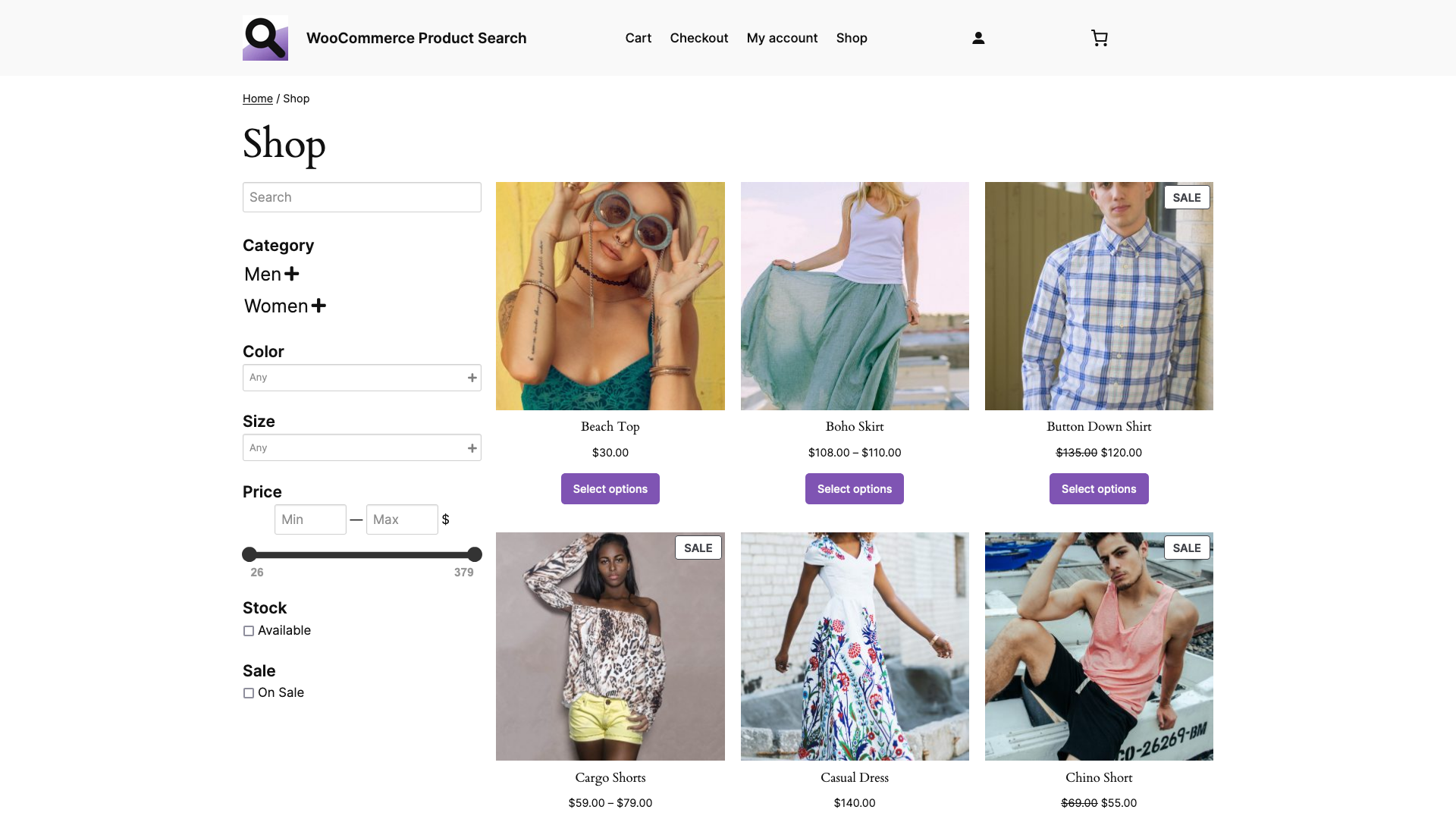
In this tutorial, you will learn how to customize the Product Catalog template of your WooCommerce shop. This default WooCommerce template uses the Product Catalog variation of the Product Collection block and is used for the Shop page. We extend the template with several blocks that allow to search and filter the products, making it…
-

The Hamburger Toilet Dilemma
When facing seemingly related problems, which aren’t. We can often see that people relate problems or tasks and their resolutions in cases where the problems are not related at all, nor should they. A common delusional strategy in engineering, development and design is to try to solve two independent problems at once, as if they…
-

WooCommerce Product Search – Building a Shop Page with Blocks
In this tutorial, you will learn how to compose a new Shop page using the exclusive blocks provided by the WooCommerce Product Search extension. The search engine is available exclusively on Woo.com and is an essential extension for every shop powered by WooCommerce. For this tutorial, we are using the Twenty Twenty-Four theme. As a…
-

WooCommerce Product Search – Building with Blocks
Using the exclusive blocks provided by the WooCommerce Product Search extension, we show how easy it is to set up live search and filter blocks for the shop. The search engine is available exclusively on Woo.com and is an essential extension for every shop powered by WooCommerce. In this video tutorial we cover the steps…
-

How to install Redis on Debian or Ubuntu
In this quick guide, you will install a free Redis server in what takes just about a minute. After you have followed the steps, you will have your Redis server instance running as a service on your host. You can use it to power the cache of your WordPress site with appropriate plugins that support…
-

How to install Memcached on Debian or Ubuntu
This brief tutorial will guide you through the steps to quickly install a free Memcached server on a Debian or Ubuntu host. After you have gone through the steps, you will have a Memcached server running as a service and you can use it to power your WordPress site with plugins that support it. You…
-

Small Tools Big
We had a recent request to put out an update for a free tool for WordPress that has a small user base. The tool is really useful but is not well-known. What it does is to substitute keywords in your pages with links – it does this automatically, based on a set of keywords and…
-

WordPress and WooCommerce Compatibility Requirements – June 2023
As of this month, we are updating relevant WordPress plugins and WooCommerce extensions to meet the following minimum version requirements and version compatibilities: Our first new update to cover these is WooCommerce Product Search 4.14.0, which has been released today. We encourage all our users to keep their installations up-to-date, to assure the best of…
-
WordPress Database Collation Troubles
If you ever come across this kind of error message in your WordPress debug.log (assuming that you have debugging enabled) … … then you have a query that involves tables which have clashing collations. In my case, one table used utf8mb4_unicode_520_ci for a row while a joined table used utf8mb4_unicode_ci for the row on which…
-

The unsettling Truth about the Global Unset
In PHP, there is a pitfall when using unset on a global variable within the scope of a function or method. When referred to using the global keyword within a function, unset will not destroy the global variable within the global scope. The output produced (1) by the code above is not a warning, but:…
-

1-Click Memberships with Groups for WordPress
The Groups plugin allows users to become a member of a group by simply clicking a button. It provides a convenient shortcode for that purpose. At the end of this article, we will also look at alternatives to shortcodes that you can use in a template. Let’s understand a simple use case where such memberships…
-

Free Lunch Optimizations
Looking at a recent support request which involves issues with an “optimization” plugin, it reminds me of why we assertively recommend to avoid using any generic optimization plugins … like the plague! From lots of years of experience in providing support for our tools, there are countless cases of issues caused by “optimization plugins”. Experience…