
The new Widgets Control plugin adds visibility management to widgets, so you can decide on which pages individual widgets should be shown and where not.
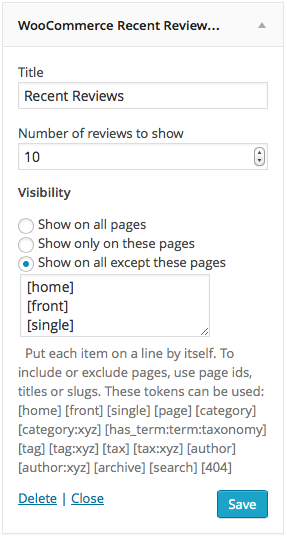
For each widget, you can choose where it should be displayed. The plugin provides appropriate options which allow you to …
- Display the widget on all pages – this is how widgets are displayed by default. It works just like WordPress handles widgets usually, it shows the widget on all pages.
- Choose which pages the widget should be displayed on. The plugin provides an option that allows you to show the widget only on some pages, while it is hidden everywhere else.
- Exlude pages from display. So you can show the widgets on allexcept some pages
To show or hide widgets on pages, the plugin allows you to indicate one or more page ids, titles or slugs and also understands a variety of tokens that identify the front page, categories, tags, etc.
The plugin’s Documentation provides details on its features, installation and usage.


Leave a Reply