
Groups 404 Redirect


Download

Download the free Groups 404 Redirect plugin for WordPress.


Description

This plugin redirects 404′s caused by hits on pages that are protected by Groups.
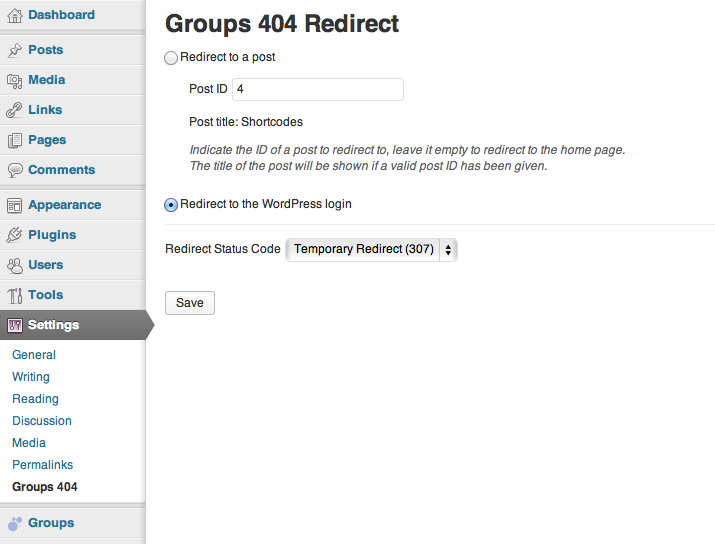
The redirection settings can be adjusted in Settings > Groups 404 :

Visits to protected pages can be redirected to:

  • a specific post, or
  • the WordPress login

The redirect status code can be selected among:

  • Moved Permanently (301)
  • Found (302)
  • See other (303)
  • Temporary Redirect (307)


Installation

  1. Upload or extract the groups-404-redirect folder to your site’s /wp-content/plugins/ directory. You can also use the Add new option found in the Plugins menu in WordPress.
  2. Enable the plugin from the Plugins menu in WordPress.
  3. Go to Settings > Groups 404 and adjust the redirection settings as desired.


References

18 comments

  • I’m using your Groups plugin with the WooCommerce Groups extension on a development site. So far it’s working great on my development site. Today I installed the Groups 404 plugin, but cannot get it to redirect to a specific postID or login page with any of the redirection options.

    I think the way Genesis handles 404 errors is the issue rather than any problem with the Groups 404 plugin. Others using Genesis may encounter the same problem. I’m going to see if the Genesis Widgetized and Not Found plugin can help. Would have been easier to use Groups 404!

    As a workaround for restricted blog posts, I’ve added a non-restricted post to the archive explaining that user would see more posts if they were logged in as a member. Thank you.

    • Thanks for sharing that, could you try the following and let me know if it works?

      Try to override Genesis’ redirection by letting the plugin act earlier, for example:

      In groups-404-redirect.php line 44 says:

      add_action( 'wp', array( __CLASS__, 'wp' ) );

      Substitute it with:

      add_action( 'wp', array( __CLASS__, 'wp' ), -1000 );

  • Good thought, but it didn’t work for me. I also tried adding the following line in the redirection section of the plugin, but without success:

    remove_action( ‘genesis_loop’, ‘genesis_404′ );

    As a workaround, I’m using the 404-widget with added text about members-only content, so I will continue to use the WC Groups plugin to restrict access.

    I’ve tried using a custom 404 but it didn’t help with the redirection.
    Thank you for your time. If I discover anything useful, I’ll share it.

  • Thank you. I know you’re busy and appreciate your looking into usage with Genesis.

  • David Anthony

    Hello there,

    Your plugins are fantastic.

    The Groups 404 isn’t working for me either. The post title is showing in the backend, indicating that I have entered a proper post ID, but it isn’t redirecting. Just displaying the 404 not found error

    Thank you so much for your time and I apologize for the inconvenience, but is there any way you can help me to make it work? My theme was built on Arturo framework if that helps at all.

    Thank you again.
    David

    • Thanks David :)

      I’d be happy to have a look at that as well, I don’t have a copy of that theme but we can ask the author if he would cooperate to see what’s happening. Are you in touch with him?

  • I’m using your Groups plugin with the WooCommerce Groups extension on a Woo Themes site, and cannot get the Groups 404 plugin to redirect to a post or the login page.

    Any suggestions? Thanks

  • I was able to get it to work on:

    http://www.seniorsignite.com

    I didn’t do anything different – it just started working today. It’s still not working on http://www.hifisocialwebmarketing.com

    Maybe this just has something to do with hosting – I host on ZippyKid. I setup a test site on zippykid, disabled all plugins except for groups and groups 404, and could not get it to work.

    Setup test site on bluehost and it works just fine.

    thanks for the plugin.

    • Hi Nancy,

      Thanks for trying it out and I’m glad you have it working now. It could also have been related to caching (I found myself wondering when testing another plugin for a demo site where WP Supercache had been enabled and had to be completely removed before things started working again).

  • My test shows the problem not redirecting is due to the permalink enabled and the post is custom type.
    Both of these return $current_post_id = 0
    $current_post_id = url_to_postid( $current_url );
    current_post_id = $wp_query->get_queried_object_id();

    As far as I can tell, url_to_postid will not work on custom post type. I am assuming get_queried_object_id suffer the same issue.

    When I disabled permalink, the redirection works.

    So, I am unable to find a solution.

    • Thanks for reporting this Robert, I’ve added an alternative function that will find the post also for CPTs and pretty links. Will release it today :)

  • Hello all,
    I have tracked down to this function
    Groups_Post_Access::public static function user_can_read_post

    If the user doesn’t have read access the function will return false. It looks like the function is also triggered for unregistered view a restricted post. The url_to_id functions always return 0. This means, we won’t able to find out the post_id either.

    • Hi Robert,

      Please try release 1.1.0 (just out a few minutes ago) which should also work fine now with what you described earlier, let me know in case you still have issues with it.

      Cheers

  • Kento,
    It works perfectly. Thank you very much for your help.

Leave a comment

Your email address will not be published. Required fields are marked *

*


+ 8 = sixteen

Please follow the Support guidelines.

Premium Support is available for customers in the Forums.