
If you came to this page looking for the latest documentation of the Decent Comments plugin, you will find it here: Documentation
The information below is outdated!
Decent Comments Widget Configuration
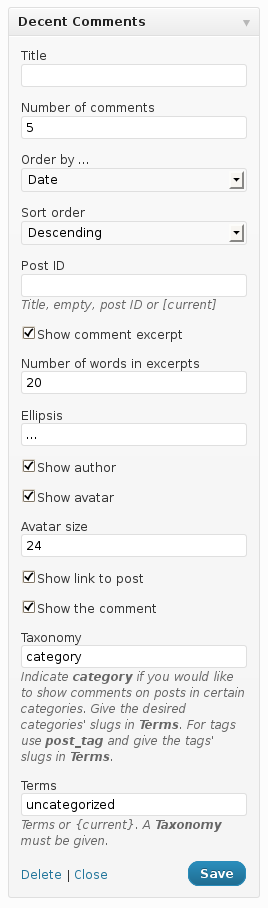
To use a Decent Comments comment widget on your site, go to Appearance > Widgets and drag a Decent Comments to the desired sidebar. If you don’t want to customize the widget’s settings, you’re done.
You can use as many Decent Comments widgets you want, each with different settings.
For each widget, these options are available:
- Title : If desired, give your widget a title that will appear above the comments.
- Number of comments : Determines how many comments will be shown.
- Order by … : Choose the criterion used to sort comments.
- Sort order : Based on the criterion, comments can be shown in ascending or descending order.
- Post ID : If empty, shows comments from anywhere on your site, based on the criterion chosen. You can enter part of the title of a post or a post’s ID to only show comments related to a specific post. You can enter [current] or {current} to show comments for the post that is currently displayed.
- Show comment excerpt : If checked, shows excerpts of the comments. If unchecked, shows the full text of comments.
- Number of words in excerpt : Determines up to how many words are shown as an excerpt for each comment.
- Ellipsis : This is shown after a comment’s excerpt, if there are more words in the comment than shown in the excerpt.
- Show author : If checked, displays the author of each comment.
- Show avatar : If checked, displays the comment author’s avatar.
- Avatar size : Determines the size of the avatars shown in pixels.
- Show link to post : If checked, shows a link to the post that the comment is related to.
- Show the comment : If checked, displays the comment excerpt or full comment.
- Taxonomy : Indicate category if you would like to show comments on posts in certain categories. Give the desired categories’ slugs in Terms. For tags use post_tag and give the tags’ slugs in Terms.
- Terms : If a taxonomy is given, indicate the slugs of the terms in that taxonomy separated by comma to show comments for all posts related to these terms. To show comments on posts related to the same terms as the current post, indicate: {current}. If a taxonomy is given and terms is empty, no comments will be shown.
Decent Comments Shortcodes
Decent Comments provides the
on Group does not Validate at LoginHi Ryan, Welcome to our support forum for Groups plugin. Based on your description, my first impression is that the...
on Affiliates paymentYou're very welcome, you can see this on the product page where you can purchase it: Affiliates Enterprise - this...

The shortcode can now also be written as
If no attributes are given, the default settings are used.
Using default settings
Place the following shortcode anywhere to show comments based on the default settings:
An example using customized settings
Place the following shortcode anywhere to show 25 comments featuring 64 pixel avatars:
on Group does not Validate at LoginHi Ryan, Welcome to our support forum for Groups plugin. Based on your description, my first impression is that the...
on Affiliates paymentYou're very welcome, you can see this on the product page where you can purchase it: Affiliates Enterprise - this...
on Manual referral for a subscriptionThis worked like a charm, thank you! I did already have the recurring referrals option enabled.
on AffiliatesHello, I have installed the free version. How do I assign a commission rate to my affiliate?
on RefferalI just noticed that the affiliates are credited under referral link in the 'Reference Amount' box rather than in the...
on Commissions when affiliates refer new usersOK, so comission is for new user in the shop NOT new affiliates in my affiliate program. Right?
on Grant public access to fileHello George, I agree, restricting access to a file is the central purpose of the plugin. However, if you think...

Shortcode attributes
The
ellipsis
Default : …
exclude_post_author
Default : false
Set to true if comments on posts from the post’s author should not be included.
excerpt
Default : true
max_excerpt_words
Default : 20
strip_tags
Default : true
avatar_size
Default : 24
number
Default : 5
order
Default : “DESC”
Possible values: “ASC”, “DESC”
orderby
Default : “comment_date_gmt”
Possible values:
“comment_author_email” : Author Email
“comment_author_url” : Author URL
“comment_content” : Content
“comment_date_gmt” : Date
“comment_karma” : Karma
“comment_post_ID” : Post
post_id
Possible values:
- “{current}” : show comments for the current post
Usage:on Decent Comments ManualHI, Thanks very much for the kind response and the help. I was 99.9% sure it wasn't an issue with...
- a post ID : show comments for a specific post
For example:
show_author
Default : true
show_avatar
Default : true
show_link
Default : true
show_comment
Default : true
taxonomy
Use category for categories or post_tag for tags.
Default : empty
terms
A comma-separated list of term slugs.
Default : empty




Hello, I’m using the shortcode for decent comments, for example to show the recent comments related to post 714, like this.
[decent_comments post_id="714" number="50" show_date="true"]
And everything works perfect.
But what about if I want to show the comments included in more than one post? For example is logic to think that this could works:
[decent_comments post_id="714, 821" number="50" show_date="true"]
But it doesn’t work.
Of course, in the same shortcode block I can add both, like this
[decent_comments post_id="714" number="50" show_date="true"]
[decent_comments post_id="821" number="50" show_date="true"]
But I want both mixed, orded by date.
Some idea to help me?
I mean is other way to shoy more than one post comments different to use this post_id=”714, 821″ ?
Thanks !
Hi Javi,
Thanks for the suggestion, this should be easy to add and I’m taking note to consider it for the next release. You won’t be able to indicate multiple post IDs unless we modify the plugin to understand those … if this is urgent and you’d like to propose the change via a pull request, you can fork our repository https://github.com/itthinx/decent-comments and issue the PR with the proposed changes.
Implementation hint would be to use the post__in parameter for the comment query instead of post_id when there are multiple IDs given.
Cheers
Hi,
great plugin. For some reason though my comment titles are not linking to the article. Cannot click them, even if I add the show_link=”true” into the shortcode. Can’t see any other reason why its not working – any ideas?
Hi Paul,
Thanks for the kind feedback on the plugin! What you mention could be related to a conflict or an issue with your theme. Could you please show us the page where you have tested it and this is happening?
Cheers!
Hi, thanks for the reply. It’s happening on all pages at the moment but here is an example page.
https://thevaccinereaction.org/vaccination-category/
The theme is Hello ,by Elementor
Hi Paul,
Thanks for the link. This is an issue with your theme’s styling. The :before of the containing div is covering up the area within which the comment links are. This rule could fix it, worked when I tried it in FF but I’m not sure if it’s the optimal solution:
div.elementor-tab-content.elementor-active:before {

	z-index: -1;

	position: relative;

}
Anyhow, this is not an issue with Decent Comments itself, but I hope this helps.
Cheers!
HI,
Thanks very much for the kind response and the help. I was 99.9% sure it wasn’t an issue with the plugin and the workaround is great – thank you for your help. Very much appreciated!
Perfect, glad I could help! Thanks for using the plugin! 🙂
Hi, is there any way to easily format the output provided by the widget? Things like making the author’s name bold, providing extra spacing, etc.
Hi David,
Yes, most of it you can target with the appropriate CSS rules – simply have a look at the HTML elements and it will be very easy to apply suitable ones.
Cheers
Hi there – Love your plugin! Is it possible to add a title inside the shortcode? I’m placing the shortcode at the end of my posts but the title that I use in the widgets (Recent comments) does not show up, so it looks a bit random. I tried [decent-comments title="Recent comments"/] but it didn’t take.
Thanks so much!
Hi Kris,
Many thanks for your kind feedback on the plugin! There’s not really an option to add a title when you are using the shortcodes, but in this case it would be quite easy to simply add a heading above the shortcode instead, something like this:
Our latest comments ...

[decent_comments]
Cheers
Thanks!
Hi! I love the plugin.. But is there a way to show the real avatar of users? It keeps showing plain wordpress avatar even though these users upload their own avatar picture. Thank you
Hi, thanks for your feedback.
In general the avatar used in comments or Decent Comments widgets and shortcodes, is the one set using Gravatar service. If the avatar in-use doesn’t display properly when visiting ie a post, then there is probably an issue with the avatar itself and how it is rendered on your theme templates.
Just in case please also make sure to update Decent Comments plugin to the latest version available which has been released 5 days ago and that the option to show avatar is enabled in the Decent Comments widget.
Kind regards,
George
Hi Antonio,
How can I modified the order of the elements.
E.g. transform Author, date, nome articolo to
Nome articolo
Author, date
in tho different rows?
Thanks a lot in advance.
Hi Mirko,
Maybe you can use the ‘decent_comments_comments_output‘ filter. You could use the original render as reference, in file: decent-comments/decent-comments-renderer.php
Kind Regards,
Antonio B.
Another commenter inquired about replacing the avatar with the posts thumbnail instead and you e-mailed a customization, could you please send that to me as well, it would be much appreciated! Thank you!
Hi Brett,
This doesn’t ring a bell right now, do you remember where you have seen the comment? Link?
Cheers
https://www.itthinx.com/plugins/decent-comments/decent-comments-manual/comment-page-1/#comment-9932
Hi Brett,
Using this code in your functions.php theme file should display the post image instead of the author avatar.
Kind Regards,
Antonio B.
That worked, thank you very much.
Perfect, please rate our plugin and support on wordpress.org.
cheers
tanks, it finally works! 😀
i really appreciate your help
Perfect.
Kind Regards,
Antonio B.
Hi
i use cache plugin but delete all caches, i mean here in admin panel: (link of screenshot below)
https://drive.google.com/open?id=0B_jnn2DpYxAcWndIdFBOU3hnQlU
do i have to change anything here?
best wishes
Hi,
You should not have to change it.
If you can, please disable the cache plugin and test the random widget. I suppose that the cache plugin is caching the widget and this is the reason because the comments are ordered.
If the problem persists, you can share your function.php file using pastebin.com, maybe here is the problem.
Kind Regards,
Antonio B.
Hi again Antonio
i disable cache plugin and delete all caches but its still not working
i want it for site main page and don’t want to display repetitious comments, its my function.php:
https://pastebin.com/CMfB0gRy
can you add this option on new update pls?
thanks for your help and time
best wishes
Hi Bahram,
Really I don’t know why the comments are not shuffled, maybe this filter is not executed, you could try to add a temporal character ‘_’ before the avatar to test if this code is executed, ex. changing:
$output .= '';to
$output .= '_';In any case, we will study it for future updates.
Kind Regards,
Antonio B.
Hi
i add ‘_’ in function and its appear in comments before avatar then the code and function.php is executed…
u can check it in site main page footer
🙁
Thanks Bahram,
Then I would say it is cache problem, either by a plugin, or by the server.
If you can disable everything related to cache and try it.
Kind regards,
Antonio B.
Hi again dear Antonio
i disable everything related to cache and nothing changes but i discover something…
they are five constant comments that display, but every time that i refresh page the order of this five changes, for example if first time a comment is on top for second time its at the end and if again refresh page its come on middle for example. i don’t know do u get what i mean? sry my English is not good
Sure,
shufflemix the elements. Maybe if you set a higher limit and then truncated the array you could do.Ex. If you want to display 5 comments, you can set as limit 20 comments, and in our function set:
function random_decent_comments_comments_output ( $output, $comments, $options ) {shuffle( $comments );
$comments = array_slice($comments, 0, 5);
....
....
}
Kind Regards,
Antonio B.
Hi Antonio
it is very kind of you, i add it in function.php but nothing happens, i want to display some customers random comments in site homepage.
address is http://www.javaherlux.com and i use decent comment in footer widgets.
another thing is after adding this code to function.php, in decent comment widget “order by” switch should be on which option?
Hi,
No option is added, Decent Comments widget comments are always suffled.
If you are using any cache plugin, maybe this is the problem.
Kind Regards,
Antonio B.
hi
tanks for great plugin. i want to know how to display random comments by “decent comments” widget in sidebar?
Hi Bahram,
this ‘order by’ option is not available.
You could use the ‘the_comments’ hook to create your own pseudo-random solution.
Kind Regards,
Antonio B.
Hi antonio
Thank you for your response, if we do this from the ‘the_comments’ hook it will effect on all site comments? or only decent comment plugins?
can you help me on this pls i am noob in wp and really need this.
Hi Bahram,
This filter affects all comments. But I have created a better solution. You need to add this code in your functions.php child theme file.
Kind Regards,
Antonio B.
Thanks for the plugin. I’m using it on my site and have set the strip_tags to false, but it still seems to be stripping out the formatting.
Did I do something wrong?
http://retiringtothephilippines.com/recent-comments/
[decent-comments strip_tags="false" avatar_size="50" number="30" taxonomy="category" excerpt="false" /]
Hi Steve,
Many thanks for pointing out the issue with the strip_tags attribute. This has been fixed in version 1.3.10 which has been released just now. If you update it, you should find it working now.
Cheers
I tried the new update but I still don’t see any paragraph breaks etc. on that page.
Does it work OK for you?
Steve
Hi Steve,
Wordpress comments system doesn’t add paragraph automatically to the comments, so the <p> and <br/> tags don’t exist in the comment content.
This is because these are nor displayed, but not dependent on the plugin, because these tags are not.
If you edit the comment in the dashboard adding these tags you can see that they are not filtered.
Kind Regards,
Antonio B.
i have a problem with accentuate caracters (éàè….) when i use excerpt they are not traduct (not UTF8 i suppose)
you can add in french traduction
excerpt : extrait
Post Type : Type Article
Number of characters in excerpts : Nombre de caractères dans les extraits
Show date : Afficher la date
Link authors : Lien Auteurs
Exclude comments from post authors : Exclure les commentaires des articles des auteurs
Ascending : Croissant
Descending : Décroissant
best regards
‘Pascal
Hi budditbud,
we’ll add them to the next update.
Thank you very much,
Antonio B.
Is it feasible to omit specific writers from display? I recognize I can omit the short articles author yet I wanted to omit various other users too.
Hi Ramin,
you can use the ‘comments_clauses’ filter to create your own filter, ex.
add_filter( 'comments_clauses', 'eggemplo_comments_clauses', 10, 2 );function eggemplo_comments_clauses( $pieces, $dcomments ) {
global $wpdb;
if ( get_class( $dcomments ) == "Decent_Comment" ) {
$users = "1,2,3,4";
$pieces['where'] .= $wpdb->prepare( ' AND user_id NOT IN ("%s")', $users );
}
return $pieces;
}
Kind Regards,
Antonio B.